Caslon font pairing: 6 combinations, shown in the real fonts
Caslon pairs best with a clean sans like Inter, Work Sans or Lato. See 6 free pairings set in the real fonts, with sizes and a social post done two ways.
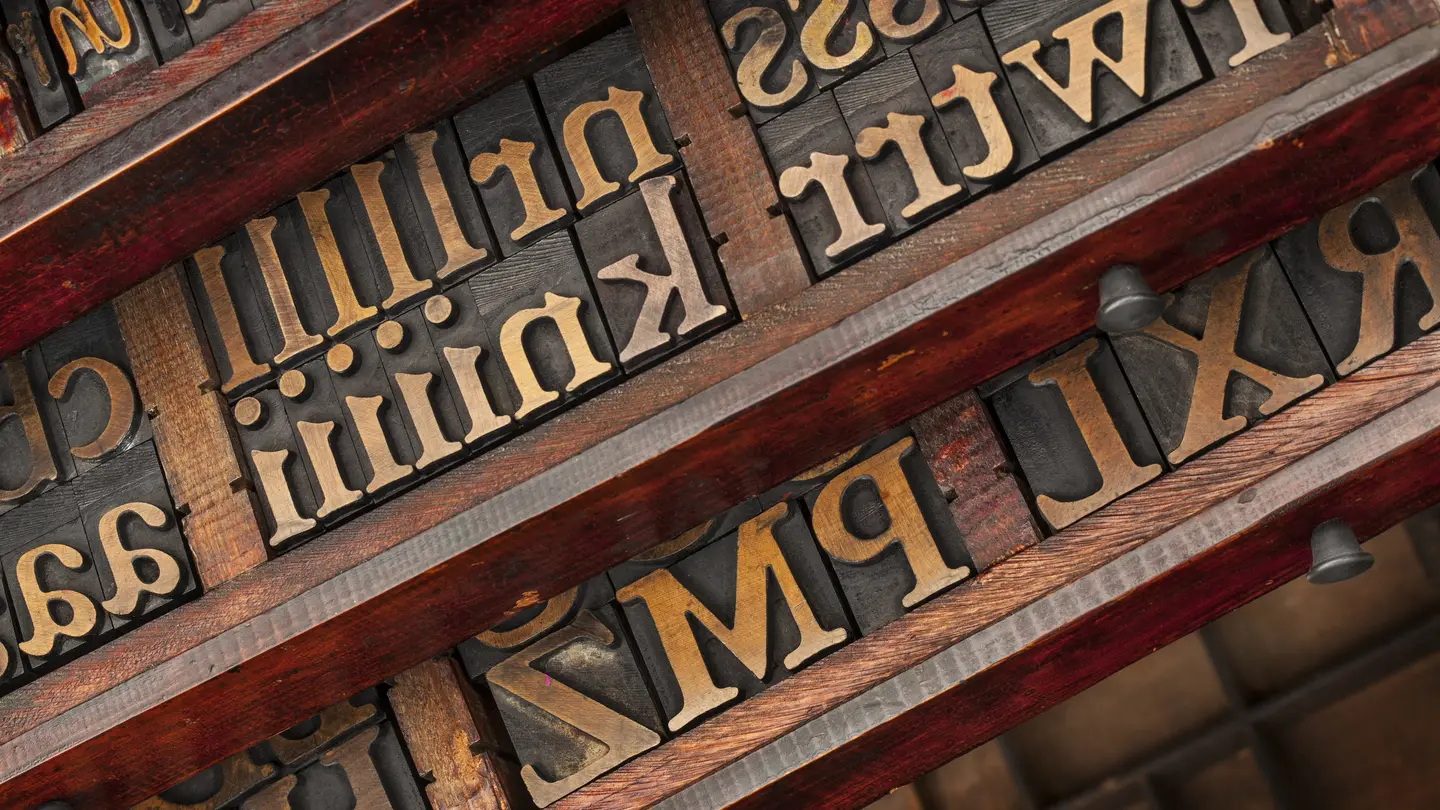
The best Caslon font pairing is usually a clean, simple sans serif such as Inter, Work Sans or Lato. It lets Caslon’s classic, slightly irregular letters carry the personality while the sans keeps everything else easy to read. Below are six Caslon pairings we set in the real fonts, with the role each one plays, the sizes we used, and the same social post designed two ways so you can see the difference.
Every font here is free on Google Fonts, so you can try each pairing today without buying a license.
What is Caslon, and which version should you use?
Caslon is the family of old-style serif typefaces cut by the English typefounder William Caslon in the 1700s. His foundry’s 1734 specimen sheet showed the full range, and the Declaration of Independence was first printed in Caslon type in 1776, according to Wikipedia’s history of William Caslon. That history is why Caslon reads as trustworthy, bookish and a little traditional.
Today “Caslon” is a group of revivals, not a single file. Some are paid, some ship with design software, and one free option covers most needs:
- Libre Caslon Display: a Caslon made for headlines. Thin strokes, high contrast, elegant at large sizes.
- Libre Caslon Text: the same design with sturdier strokes, made for body text. Google Fonts describes it as optimized for web body text at around 16px, while the Display version is for headlines.
Rule of thumb: use the Display cut for anything big (a headline, a logo, a post title) and the Text cut for anything you read in sentences. The Display cut’s thin strokes get fragile and hard to read at small sizes, especially on a phone.
6 Caslon font pairings, shown in the real fonts
Each card below shows the headline font on top and the body font underneath, set exactly as you’d use them.
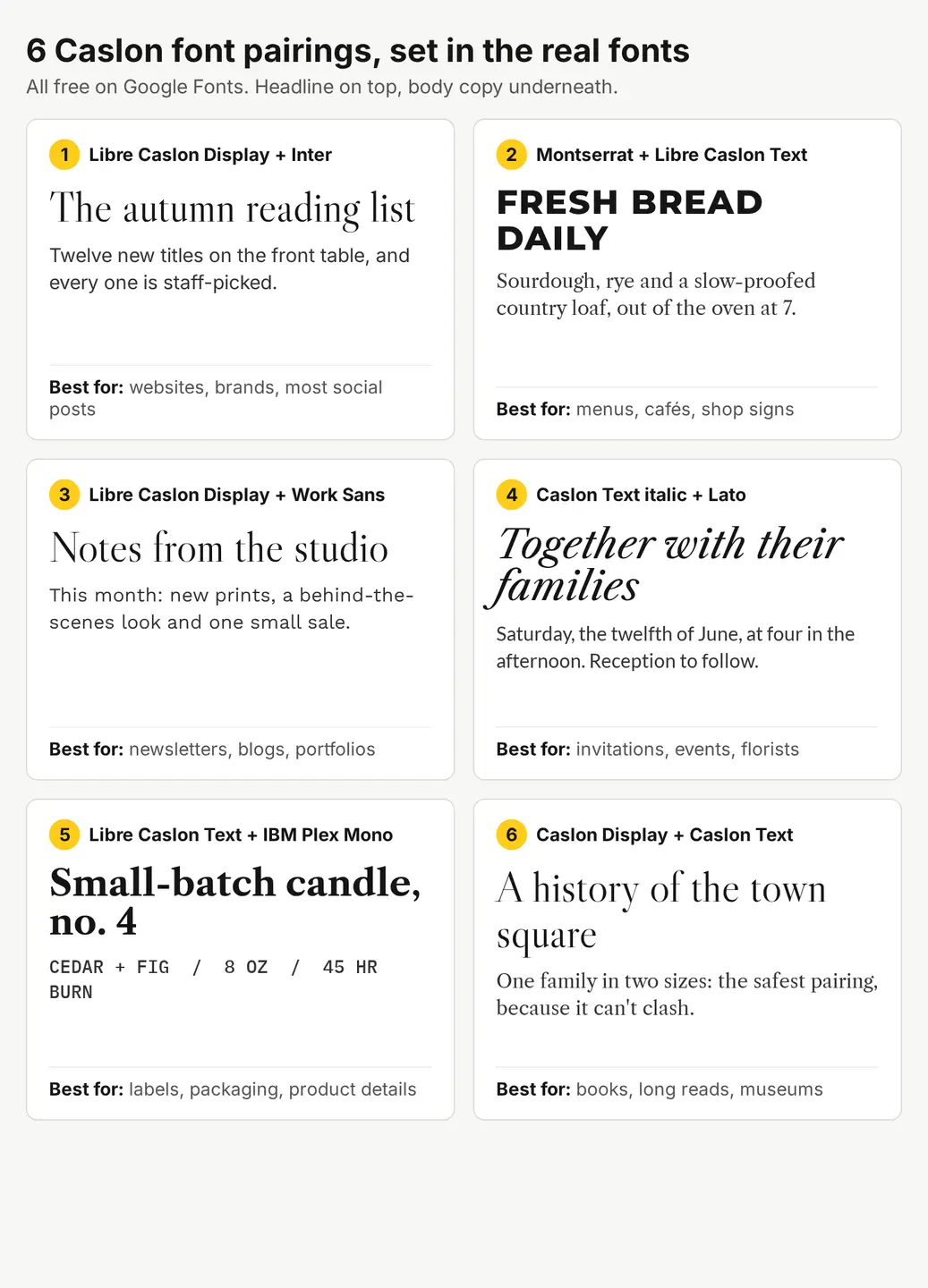
- Libre Caslon Display + Inter. The all-rounder. Inter is neutral and very readable on screens, so the Caslon headline does all the talking. Start here if you’re not sure.
- Montserrat + Libre Caslon Text. Flip the roles: a bold, wide sans in capitals for the headline, Caslon for the sentences. It looks like a shop sign or a menu board.
- Libre Caslon Display + Work Sans. A little warmer and more editorial than Inter, with slightly wider letters. Good for newsletters and portfolio sites.
- Libre Caslon Text italic + Lato. Caslon’s italic is soft and lively, and Lato’s rounded shapes match its mood. Made for invitations, events and florists.
- Libre Caslon Text + IBM Plex Mono. A monospaced font for small details (scent, weight, burn time, price) next to a bold Caslon name. It reads like a printed label.
- Libre Caslon Display + Libre Caslon Text. One family in two sizes. It can’t clash, so it’s the safest choice for long reads, books and anything formal.
The sizes and weights we used
| Pairing | Headline | Body | Use it for |
|---|---|---|---|
| Caslon Display + Inter | Caslon Display, regular, 66px | Inter, regular, 30px | Websites, brands, most social posts |
| Montserrat + Caslon Text | Montserrat ExtraBold, capitals, 52px, letter spacing +2 | Caslon Text, regular, 30px | Menus, cafés, shop signs |
| Caslon Display + Work Sans | Caslon Display, regular, 66px | Work Sans, regular, 30px | Newsletters, blogs, portfolios |
| Caslon Text italic + Lato | Caslon Text italic, 60px | Lato, regular, 30px | Invitations, events |
| Caslon Text + IBM Plex Mono | Caslon Text bold, 56px | Plex Mono medium, capitals, 28px | Labels, packaging, product details |
| Caslon Display + Caslon Text | Caslon Display, regular, 66px | Caslon Text, regular, 30px | Books, long reads, museums |
Those pixel sizes are for a 1080px-wide social image. For a website, keep the same ratio: a headline about twice the size of the body text, with the body at 16px or more.
How do you choose a font to pair with Caslon?
Three checks get you most of the way:
- Contrast, not competition. Pair Caslon with something clearly different: a sans serif, a monospace, or its own italic. Two different old-style serifs side by side tend to look like a mistake rather than a choice.
- Similar height. Caslon’s lowercase letters are fairly short compared with its capitals. Sans serifs with very tall lowercase letters can look oversized next to it, so set the sans a size or two smaller than you’d guess, then compare.
- One personality. If the headline is Caslon, keep the body quiet. If the headline is a loud sans (pairing 2), let Caslon be the calm one.
Then limit yourself to two fonts and at most two weights each. Most of the “doesn’t look right” problems with Caslon come from adding a third font.
What does a Caslon pairing look like on a social post?
Here is the same 4:5 Instagram post designed with pairing 1 and pairing 2. The background is an AI image we made with Create, our AI image generator, for 1 credit. It’s an AI image, not a photo of a real bookshop. We asked for an empty top half so the text has a calm place to sit:
A photoreal top-down photo of a wooden bookshop table in autumn, a few stacked hardcover books with plain solid-color covers in rust, mustard and deep green in the lower half of the frame, a ceramic cup of coffee and a small vase of dried orange leaves, warm soft morning window light, the upper half of the frame is calm empty dark wood grain with nothing on it
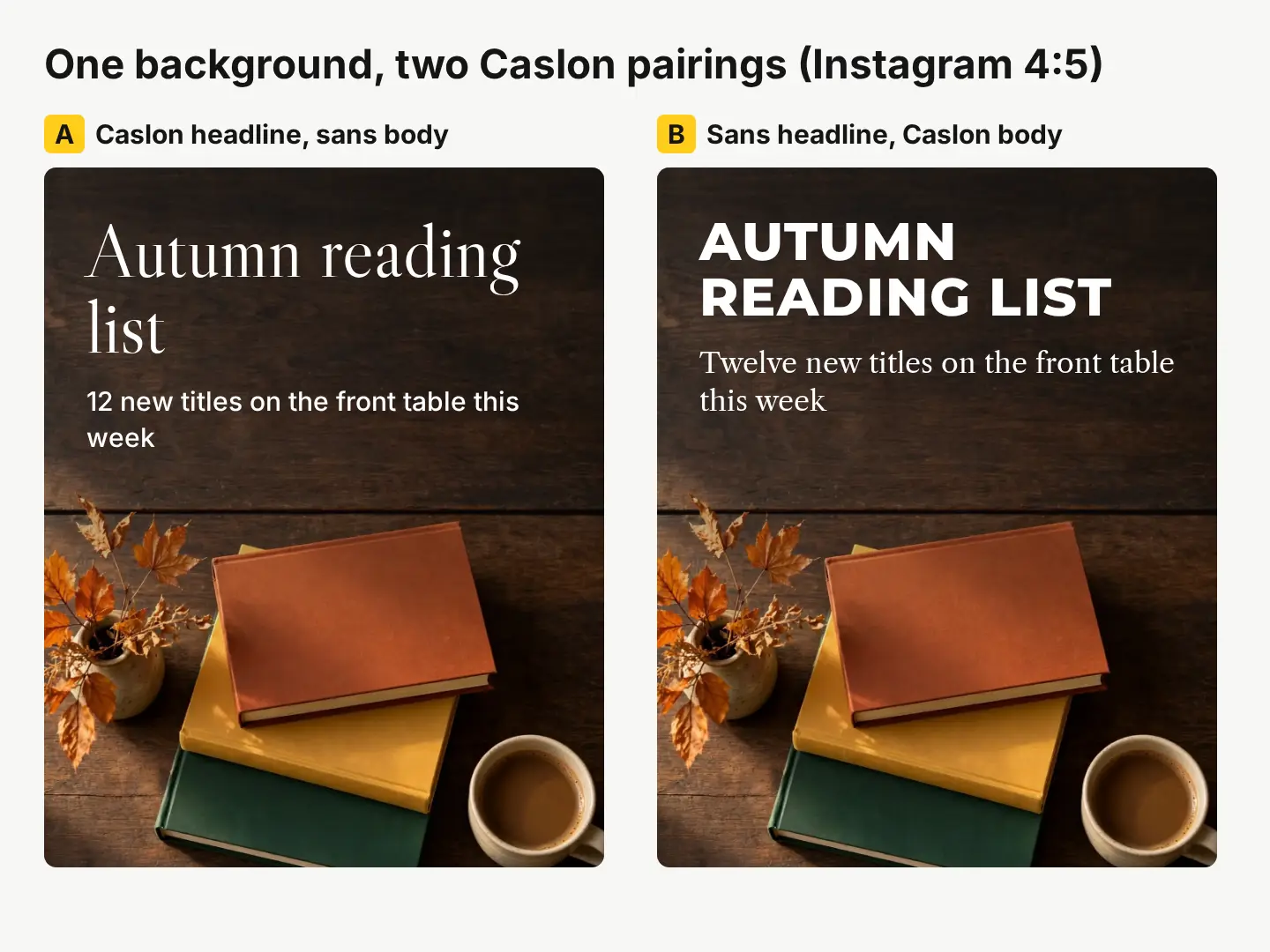
What the comparison shows:
- Version A feels literary and calm. The thin Caslon strokes look elegant big, but they need the dark gradient behind them to stay readable on a phone.
- Version B stops the scroll faster. The heavy capitals read at a glance, and the Caslon line underneath keeps it from looking generic.
- Both keep the caption short. Caslon looks its best with a few words and plenty of space around them.
If you’re putting text over a busy photo, our guide to making text readable on a photo compares four fixes with contrast numbers.
Can you use Caslon fonts commercially?
It depends on the version. The free Libre Caslon family is released under the SIL Open Font License, as listed on its Google Fonts page, which allows commercial use in logos, posts, packaging and websites. Paid Caslon revivals each come with their own license, so read it before you use one on products.
The font license and the image license are separate things. A licensed stock photo from our library covers ads, social posts and products, with print runs up to 500,000 copies. AI images you make with Create can be used commercially too, but they come with no legal protection and may not be copyrightable in many countries. The details are on our license page.
Make your own Caslon post in 5 steps
- Pick a pairing from the six above. Not sure? Use Libre Caslon Display + Inter.
- Get a background with calm space. Pick a real photo from our stock library for 10 credits ($0.10), or describe one in Create for 1 credit and ask for an empty area where the text will go.
- Add the text in our free photo editor. Use the Text tool for the headline and caption, add a color box behind the words if the photo is busy, and pick a text color straight from the picture. If Caslon isn’t in the font list, choose the closest classic serif for the headline and keep the same structure.
- Check it at phone size. Shrink the preview to feed size. If the thin Caslon strokes disappear, make the headline bigger or darken the area behind it.
- Export every size at once with the social media resizer: one design out as Instagram, Facebook, Pinterest and more, in one zip, free.
New accounts get 20 free credits with no card, then 3 free credits every day, which is enough to make a background and test several layouts this week.
Questions people ask
- Is Caslon a good font for a logo?
- Yes, for brands that want to look established, literary or traditional. Use a Display cut at a large size, and test the logo small too, because Caslon's thin strokes can fade at icon sizes.
- Does Caslon go with Garamond or Baskerville?
- Usually not as a headline and body pair. They're all classic serifs, so side by side they look almost the same but not quite. Pair Caslon with a sans serif, a monospace or its own italic instead.
- What is a free alternative to Adobe Caslon?
- Libre Caslon, on Google Fonts. It comes in a Text version for body copy and a Display version for headlines, and its open font license allows commercial use.
- Is Caslon good for body text on a website?
- Yes, if you use a version made for text, such as Libre Caslon Text, at 16px or larger. Save the thin Display version for headlines.
Keep reading
 DesignWedding color palette ideas: 6 palettes with hex codesUse 3 to 5 colors in a 60/30/10 split: a light base, one or two main colors, one accent. Six palettes with hex codes, plus how to preview yours.
 DesignHow to make text readable on a photo: 4 fixes comparedGive the words a calm, high-contrast spot: a dark gradient, a color box, or a cleared area. We tested all four on one busy photo, with contrast numbers.
 Photo editingHow to restore old photos: scan, repair and colorizeScan the print, let AI repair scratches, cracks and fading, then touch up by hand. Step by step, with scanning tips and real costs: 2 cents a photo.