Restaurant menu with photos: which dishes to show, and sizes
Show 3 to 5 dishes, not all of them, and always your own food. Which plates deserve a photo, where stock and AI fit, and every size you need.
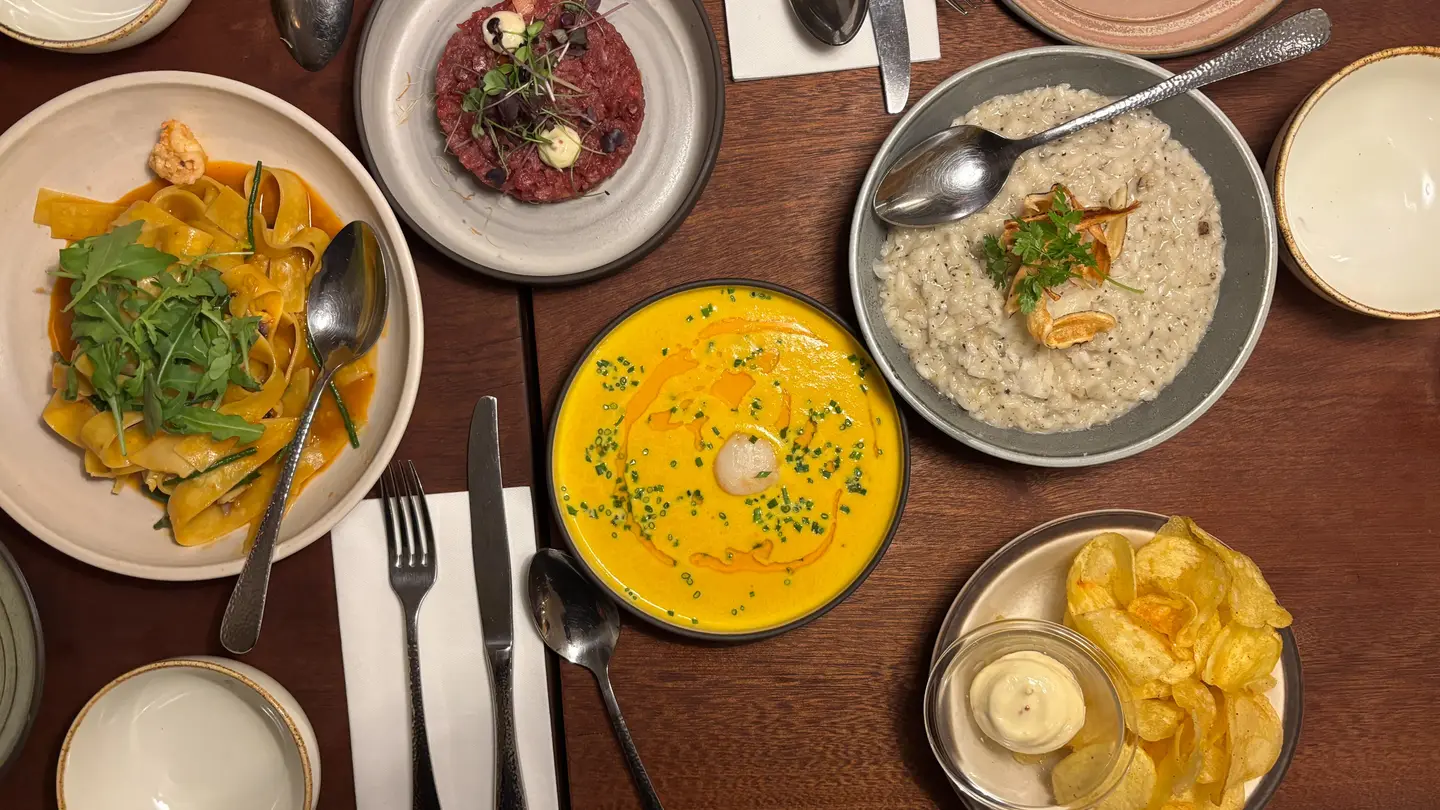
A restaurant menu with photos works best when it shows a few dishes, not all of them: one strong photo per section, on the plates you most want to sell or the ones guests can’t picture from the name. Every dish photo should be your own food, shot in your kitchen, because the plate that arrives has to match the picture.
This guide covers which dishes deserve a photo, where stock and AI images do fit on a menu, the pixel sizes for print, delivery apps and screens, and a real menu header we made with our own tools for 2 credits.
Is a restaurant menu with photos a good idea?
It depends on what you serve and who you serve it to. Photos earn their place when:
- The dish is unfamiliar. A photo explains a regional specialty faster than three lines of description.
- Guests don’t read the language well. Tourist areas and menus with many imported dish names benefit most.
- You want to steer orders. A photo next to a high-margin starter, a signature main or a dessert draws the eye there first.
- People order without a server. Kiosks, QR menus and delivery apps have no one to answer “what does that look like?”
They work against you when the photos are poor, when the kitchen can’t plate the dish the same way every night, or when your concept is fine dining, where a printed menu is usually text only and the photos live on your website and social accounts instead.
The middle ground suits most casual restaurants: photos on a small number of dishes, plus text everywhere else.
How many photos should a restaurant menu have?
For a one-page printed menu, three to five photos is plenty: one per section, on the dish that section should sell. More than that and the page turns into a catalog where nothing stands out, and you’ll spend more on photography and reprints every time a recipe changes.
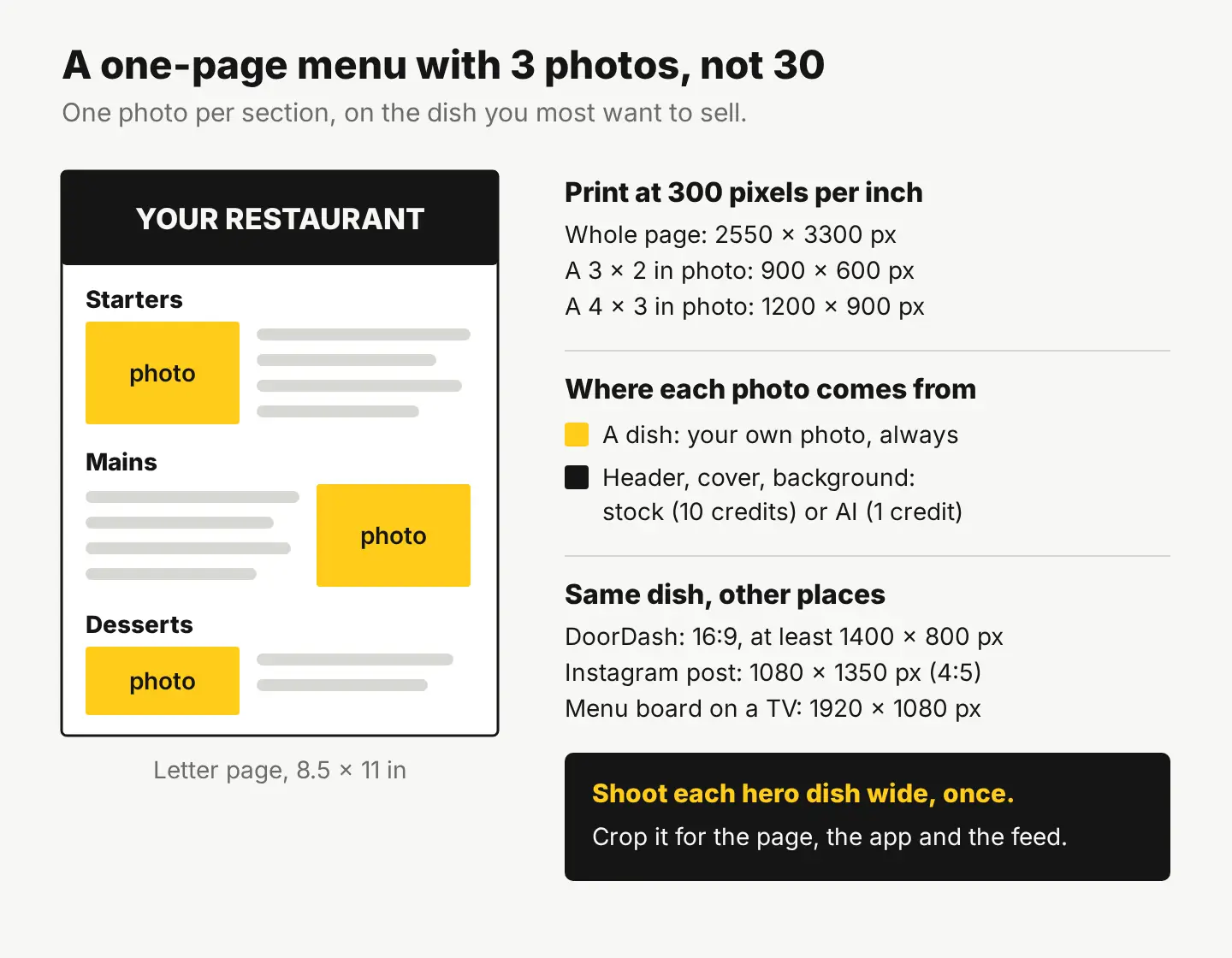
Pick the photographed dishes with these questions:
- Does it make you money? Start with the dishes that have your best margin, not your cheapest.
- Is it a best seller or a signature? The dish people come back for is the one strangers should see.
- Can the kitchen plate it the same way every time? If not, skip the photo until it can.
- Will it stay on the menu? A seasonal special belongs on a table card or a post, not on the printed menu.
Online, the rule flips. On delivery apps and your own ordering page, a photo on every item helps, because each item gets its own small tile instead of sharing a page.
Can you use stock photos or AI images on a menu?
Yes, for everything that isn’t a dish: the cover, the header behind your logo, section dividers, a background for the drinks list, the “private events” panel. No, for the food itself. A stock photo of lasagna next to your lasagna is a promise your kitchen didn’t make.
Delivery apps enforce this. DoorDash, for example, rejects stock images and asks that each photo show the item the customer actually receives, in landscape 16:9 at no less than 1400 × 800 pixels (DoorDash’s guide to rejected menu photos). We covered the same line for coffee shops in what photos a café or bakery needs.
| Part of the menu | Your own photo | Stock photo | AI image |
|---|---|---|---|
| A dish next to its name and price | Yes | No | No |
| Cover or header behind your logo | Yes | Yes | Yes |
| Section dividers and backgrounds | Yes | Yes | Yes |
| The dining room or terrace | Yes | No: it isn’t your room | No |
| Seasonal and holiday inserts | Yes | Yes | Yes |
| Delivery app item tiles | Yes | No | No |
A licensed stock photo from our catalog costs 10 credits ($0.10), and the license covers printed menus with print runs up to 500,000 copies. An AI image costs 1 credit and can be used commercially, but it has no legal protection and may not be copyrightable, so don’t build your logo on one. The license page has the full terms.
A real menu header, made for 2 credits
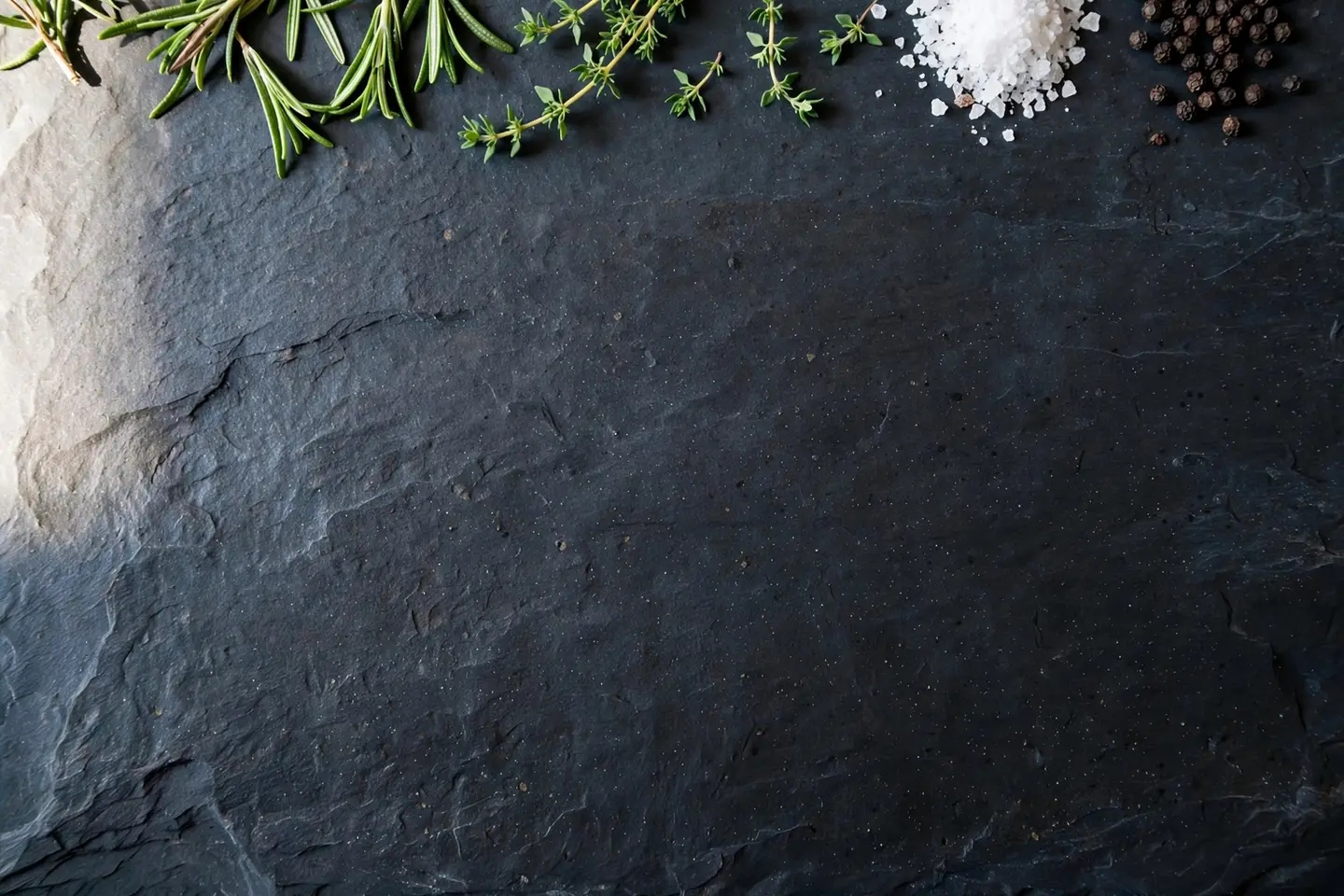
Here’s an example of the “everything but the dish” part. We wrote one prompt in Create for a background that leaves room for a logo and section titles, then used Edit by prompt to make a holiday version of the same image. Both are AI images, made for this article.
The prompt (1 credit):
A photoreal overhead view of a dark slate stone surface, with a few sprigs of fresh rosemary and thyme, a small pile of coarse sea salt and whole black peppercorns arranged along the top edge only, a large plain empty dark area filling the center and bottom of the frame, soft natural daylight from the left, no plates, no food dishes, no people
Then Edit by prompt (1 credit), on that same image: “Add a few small fresh pine sprigs and a handful of red cranberries among the herbs along the top edge. Keep the slate surface, the rosemary, thyme, salt and peppercorns, the large empty dark area in the center and bottom, and the lighting exactly as they are.”
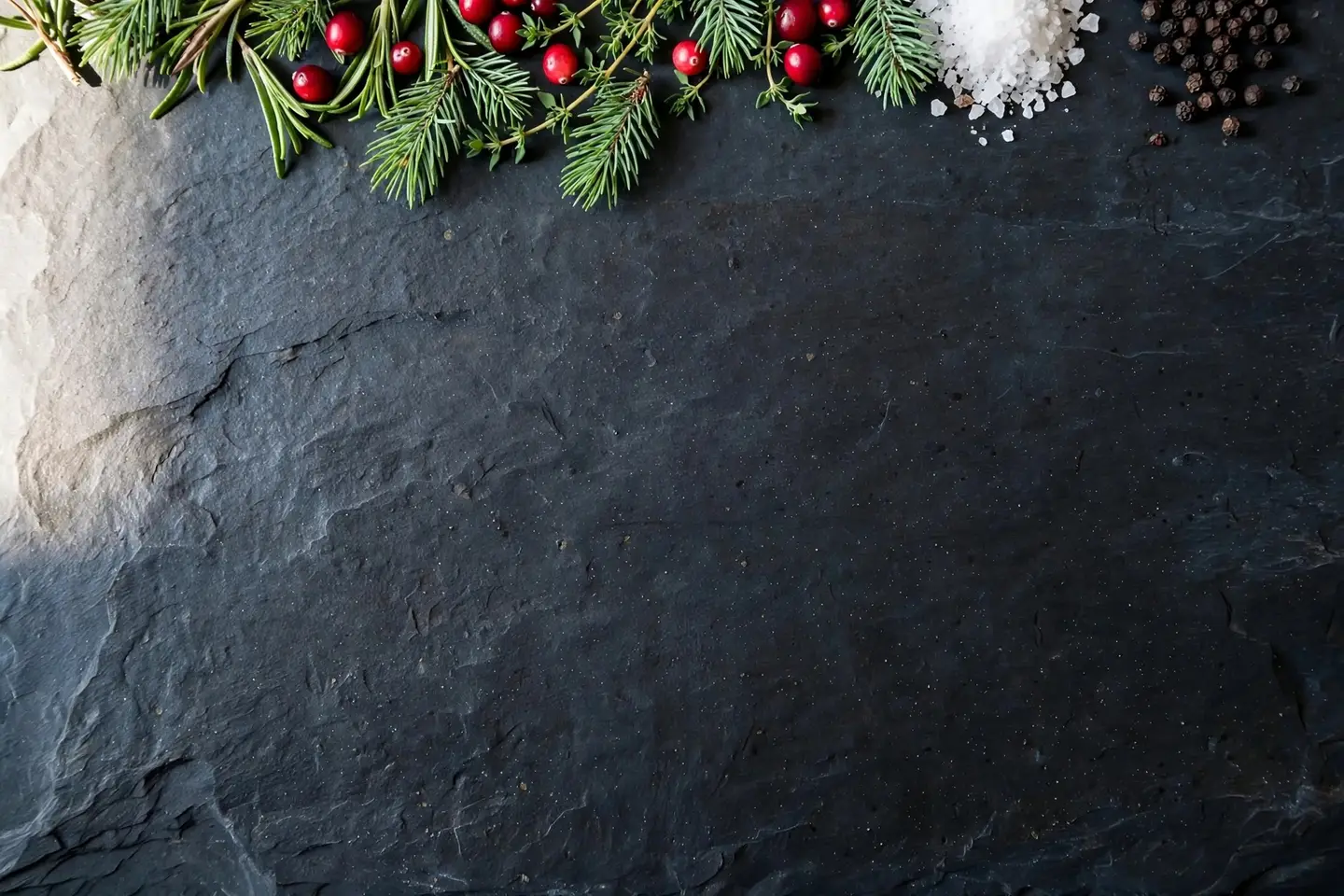
Three things made it work. The prompt says where the empty space goes, so text has somewhere to sit. It names ingredients a kitchen actually uses, so it reads as “restaurant” without showing a dish you’d have to serve. And it says “no plates, no food dishes”, so nobody mistakes it for a menu item.
Add your name and section titles in the free photo editor with Text or WordArt, and export the size you need with Resize & export.
What size should menu photos be?
Print needs far more pixels than a screen. The common rule is 300 pixels per inch at the printed size:
| Where the photo goes | Size in pixels |
|---|---|
| A 3 × 2 in photo on a printed menu | 900 × 600 |
| A 4 × 3 in photo on a printed menu | 1200 × 900 |
| A full letter page (8.5 × 11 in) | 2550 × 3300 |
| DoorDash item photo | at least 1400 × 800, 16:9 |
| Instagram post | 1080 × 1350 (4:5) |
| Menu board on a TV | 1920 × 1080 |
A modern phone photo is big enough for all of these. Trouble starts with old photos or ones sent over chat apps, which often arrive shrunk. Run those through the HD Upscaler (1 credit, up to 4× and 4K) before they go to the printer, or Quick Upscale 2× in the editor for free when the photo only needs to double.
How to shoot your own dish photos
You don’t need a studio for a menu. You need the same setup every time, so the photos look like one menu:
- Use daylight. A table next to a window, mid-morning or mid-afternoon, with the overhead lights off.
- Pick one surface and one angle per menu. Overhead for bowls, pizzas and sharing plates; a low 45° angle for burgers, sandwiches and cakes.
- Plate it exactly as it’s served. Same plate, same portion, same garnish. The photo is a promise.
- Shoot wide. Leave space around the plate so you can crop to 16:9 for the app, 4:5 for Instagram and 3:2 for print from one photo.
- Clean up, don’t change the food. In the free editor, use Crop & resize, Adjust & Finetune for brightness and warmth, and Magic eraser for a crumb or a stray fork. Don’t make the portion bigger or the sauce shinier than it is.
For packaged items you also sell to go, like a bottled house sauce or a jar of chili oil, Product Studio turns one phone photo into 4 studio shots for 10 credits. That’s the item as it is, placed in a new scene.
Your next step
Make a list of every section on your menu and write one dish next to each: the one you’d recommend to a first-time guest. Photograph those dishes this week, in the same spot, and leave the rest of the page as text. Then make the header in Create for a cent and save it for the next reprint.
Questions people ask
- Do I need a professional photographer for menu photos?
- Not for most casual restaurants. A recent phone, window light and the same table and angle for every dish give consistent photos. A photographer is worth it for a launch or a big reprint.
- Can I use a customer's photo of my food on the menu?
- Only with their permission. The person who took the photo owns it, so ask in writing before you print it or use it in an ad.
- Should a QR code menu have photos?
- Yes, more than a printed one. A QR menu is read on a phone with no server to ask, so a small photo on each popular item helps guests choose.
- How often should I update my menu photos?
- Whenever the plating, portion or recipe changes. If the dish no longer looks like its photo, retake it before the next print run.
Keep reading
 By industryWhat photos does a café or bakery need? Shot list and sizesYour own photos for the menu and the shop, stock or AI images only for mood and backgrounds. The full shot list, sizes, and a month of images for 62 credits.
 By industryWhat photos does an Etsy listing need? A shot-by-shot planThe real item first, then details, scale, options and packaging, at 2000 px or more. The full shot list, Etsy's crop trap, and free tools to make each photo.
 Photo editingHow to change the background of a photo: 3 ways comparedCut it out for free, blend it into a real scene, or describe a new one with AI. A real before and after, costs side by side, and iPhone tips.