Stock photo or AI image? How to choose for each job
Use a real stock photo when the image must be true or needs legal protection; use AI when stock lacks the scene. Costs, license and a checklist.
Use a real stock photo when the picture has to be true: real people, real places, anything a customer will take at face value, or any time you want legal protection behind the image. Use an AI image when stock simply doesn’t have the scene you need, or when you need an idea, a style or a variation more than a record of reality.
That’s the short answer. Below is the longer one: what actually differs between the two (price, license, protection, copyright), a worked AI example with the exact prompt we used, and a checklist you can run through before every image you pick.
What’s the real difference between a stock photo and an AI image?
Both are pictures you can put on a website, an ad or a product. The differences are in where they come from and what stands behind them.
A stock photo was taken by a real photographer, of something that existed in front of a camera. An AI image was generated from a text description. Nothing in it was ever photographed, even when it looks like it was.
Here’s how the two compare on StockUnlimited, using our actual prices and license terms:
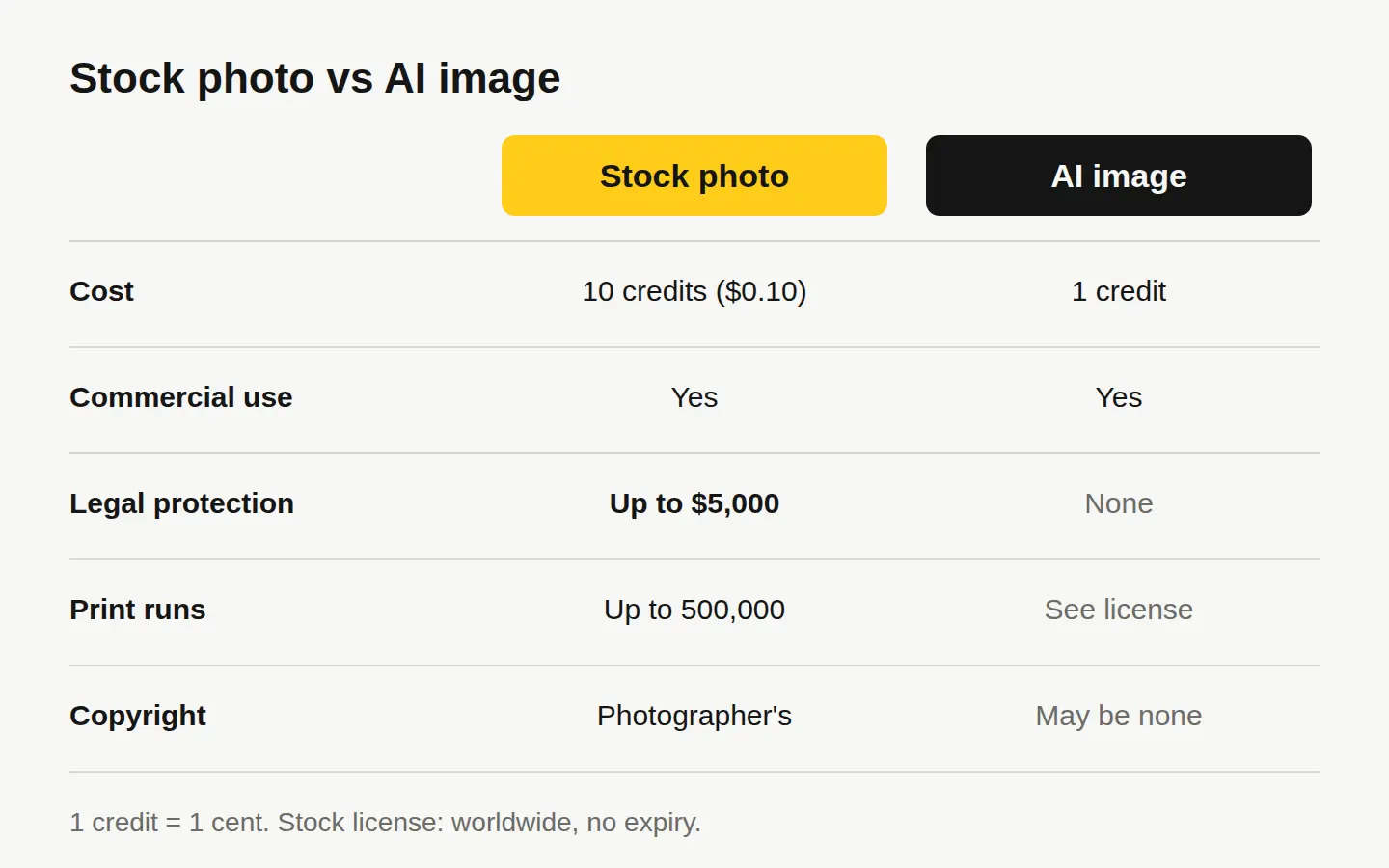
| Stock photo | AI image | |
|---|---|---|
| Cost | 10 credits ($0.10) | 1 credit (1¢) |
| Where it comes from | Shot by a real photographer | Generated from your description |
| Commercial use | Yes: ads, social, products | Yes |
| Print runs | Up to 500,000 copies | See our license |
| Legal protection | Up to $5,000 for claims about the photo itself | None |
| Copyright | Held by the photographer; you get a license | May not be copyrightable in many countries |
| Shows real people and places | Yes, with model releases where needed | Never real people, brands or logos |
The price gap is real but small: a stock photo costs ten times as much, and that’s still a dime. The bigger difference is the bottom half of the table. A licensed photo comes with protection and a clear chain of ownership. An AI image comes with neither.
When does a real photo win?
Pick a stock photo when any of these are true:
- The image makes a claim about reality. A photo of a city skyline, a type of food, a workplace or a landscape tells the viewer “this is what it looks like.” If that picture is invented, you’re making a claim you can’t back up.
- People are the subject. Real faces, real expressions and real hands still read as real. Stock photos of people come with model releases where they’re needed, so you know the person agreed to be photographed for commercial use.
- You want protection. Our stock license includes legal protection up to $5,000 for claims about the photo itself. AI images have no legal protection at all.
- It’s going into print at volume. Our stock license covers print runs up to 500,000 copies, worldwide, with no expiry. That covers flyers, packaging and most merch runs.
- Trust matters more than style. Product pages, about pages, testimonials sections and anything else where a reader decides whether to believe you.
One thing a stock license won’t let you do: resell the photo on its own, as a print or a download, for example. It has to be part of something you made. Our license page spells out the rest, including the model-release and editorial-only limits.
When does an AI image fill the gap better?
AI earns its place when stock can’t give you the picture you need:
- The scene doesn’t exist. A product concept before it’s manufactured, a mood board for a room that hasn’t been built, an illustration of an abstract idea.
- You need an exact look. Your brand colors in the background, a particular season, a specific angle, a flat-lay arranged the way your layout needs it.
- You need many variations fast. At 1 credit an image, you can try ten directions for a dime.
- It’s clearly an illustration, not evidence. Blog headers, concept art, backgrounds and textures where nobody will assume they’re looking at a photograph.
On Create, you describe the image and get it for 1 credit. If you’d rather it not be saved anywhere, Private mode keeps the image in your browser only, with nothing stored on your account or our servers.
A worked example: one brief, made with AI
Here’s a real brief a café owner might have: a hero image for an autumn menu, with a warm, quiet morning feel and space on the left for a headline.
We gave our image generator this prompt:
A photoreal close-up of a ceramic mug of coffee and a slice of pumpkin loaf on a worn oak café table by a window, soft low morning sun, a few fallen maple leaves, the left third of the frame empty and softly out of focus, warm autumn tones.
This is what came back, for 1 credit:

What worked: the composition follows the brief, the empty space on the left is exactly where a headline would sit, and the palette matches an autumn menu. Getting that layout from stock would mean a lot of searching and then cropping.
What we’d still check before using it:
- Does it look like a specific real place? If a customer could take it as a photo of your café, it’s misleading. As a mood image for a seasonal menu, it’s fine.
- Is the food what you actually serve? We asked for a slice and got the end of a loaf topped with seeds and walnuts. If your pumpkin loaf looks different, a real photo of it (or a shot from Product Studio) is the honest choice.
- Anything strange on close inspection? Look at edges, reflections and anything that should be symmetrical, like the handle of the mug.
The takeaway: this image is good at mood and layout. It’s the wrong choice for “here’s what you’ll get when you order.”
Can you copyright an AI image, and does it matter?
In the US, mostly not. The US Copyright Office’s report on copyrightability says typing a prompt isn’t enough to make you the author of what comes out. Protection can apply only where a human adds enough creative expression, for example by arranging or modifying the output.
Our own terms say the same thing in plain words: you can use AI images commercially, but they may not be copyrightable in many countries, and they come with no legal protection.
Why that matters in practice:
- You may not be able to stop others from using it. Fine for a blog header. A problem for a mascot, a signature product image or anything that has to be yours alone.
- A logo is a bad job for raw AI output. If the mark is the core of your brand, have a designer build it, or at least rework the AI draft into something substantially your own.
- A stock photo isn’t yours either. You get a license, not the copyright. The difference is that the license is clear and comes with protection.
Do you have to label AI images?
It depends on where you post. Meta, for example, adds an “AI info” label to images it detects as AI-generated or that people disclose as AI, and explains how on its page about labeling AI content. Ads about politics and social issues have stricter disclosure rules there.
Beyond platform rules, the simple test is honesty: never present an AI image as a real photograph. A caption like “Illustration made with AI” costs nothing and protects your credibility, which is worth more than the image.
A quick checklist before you choose
Run through these in order. The first “yes” decides it.
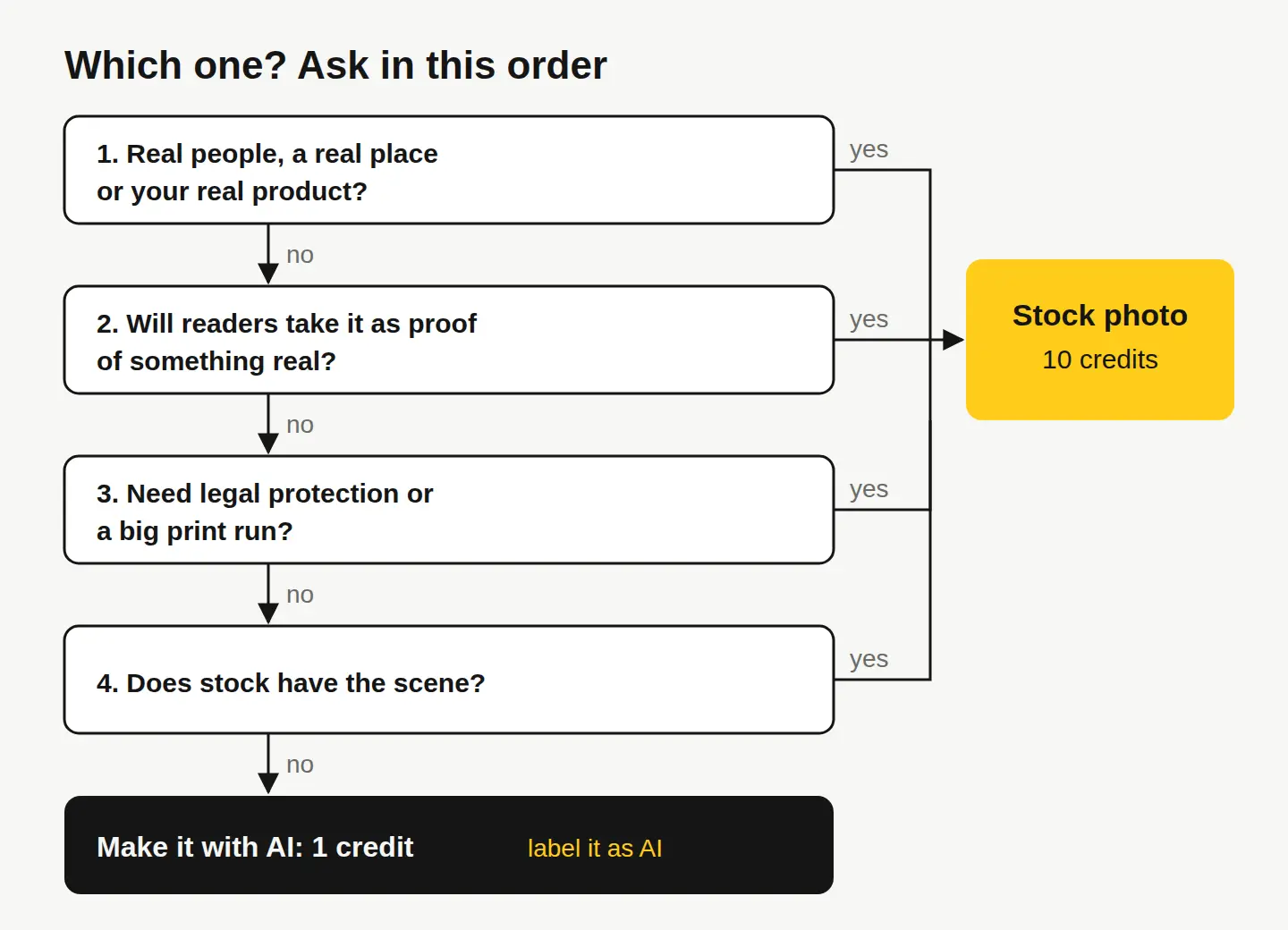
- Does it show real people, a real place or your real product? Use a stock photo (or your own photo).
- Will a reader take it as proof of something? Use a stock photo.
- Do you need legal protection or large print runs? Use a stock photo: it covers print runs up to 500,000 copies and comes with protection up to $5,000.
- Does stock have the scene? Search first. With 300 million photos, it often does, for 10¢.
- Still nothing that fits? Make it with AI for 1 credit, and label it as an illustration where it could be mistaken for a photo.
Many projects end up using both: a real photo where trust matters, and an AI image where the idea matters. They can also share one edit: our free editor handles crops, text and filters for either.
Your next step
Pick the next image you actually need, and run it through the checklist above. Start by searching our ready-made stock photos; if nothing fits, describe it in Create. Every new account gets 30 free credits with no card, then 3 free credits every day, enough for three stock photos or thirty AI images to start. See pricing for what comes after.
This is general information, not legal advice. For the exact terms, read our license.
Questions people ask
- Is it cheaper to use AI images than stock photos?
- Per image, yes: an AI image costs 1 credit and a stock photo costs 10 credits ($0.10) on StockUnlimited. But the AI image comes with no legal protection, while the stock photo is covered up to $5,000.
- Can I use AI images for commercial purposes?
- Yes. Our license allows commercial use of AI images you create. They carry no legal protection and may not be copyrightable in many countries, so avoid relying on them for things that must be yours alone, like a logo.
- Can I edit a stock photo and still use it under the license?
- Yes. Editing doesn't change the license, but the legal protection covers the original photo only, not the changes you make.
- Can an AI image replace a photo of a real person?
- Not honestly. An AI-generated person was never photographed and never signed a model release. If a real face belongs in your ad or page, use a stock photo with a model release, and never generate lookalikes of real people or celebrities.