How to make Halloween images with AI for your business
Pick a mood, describe the scene and props, and leave room for your text. Two real examples with exact prompts, plus a stock photo decorated for Halloween with AI.
To make a Halloween image with AI that you can actually post, pick one mood (cozy, playful or spooky), describe a real scene with specific props and light, and ask for empty space where your text will go. With Create on StockUnlimited, each try costs 1 credit, so you can test a few versions for pennies.
This guide shows two Halloween images we made for this article with the exact prompts, a licensed stock photo we decorated for Halloween with one AI edit, a mood cheat sheet, and what to check before you post.
What makes a Halloween AI image look good enough to post?
Most Halloween AI images fail in the same three ways: the mood is muddled (cute ghosts next to a horror-movie forest), the scene is crowded with every Halloween cliché at once, or there’s nowhere to put your offer. Fix those three and the rest is easy.
A prompt that works has five parts:
- The shot: “a photoreal overhead view of…” or “a wide view of…”.
- The subject: what your post is about, in plain words (“a bakery tray of pumpkin-shaped sugar cookies”).
- Props: two to four, not ten (“small decorative pumpkins and cinnamon sticks”).
- Light and mood: one mood, said out loud (“soft window light, playful and cozy mood”).
- Room for text: “the top third of the frame plain and empty.”
If you want the longer version of this structure, see how to write AI image prompts that get what you want.
Which Halloween mood fits your business?
Pick the mood before you write a single word of the prompt. It decides the light, the colors and the props, and it keeps the image from turning into a mix of everything.
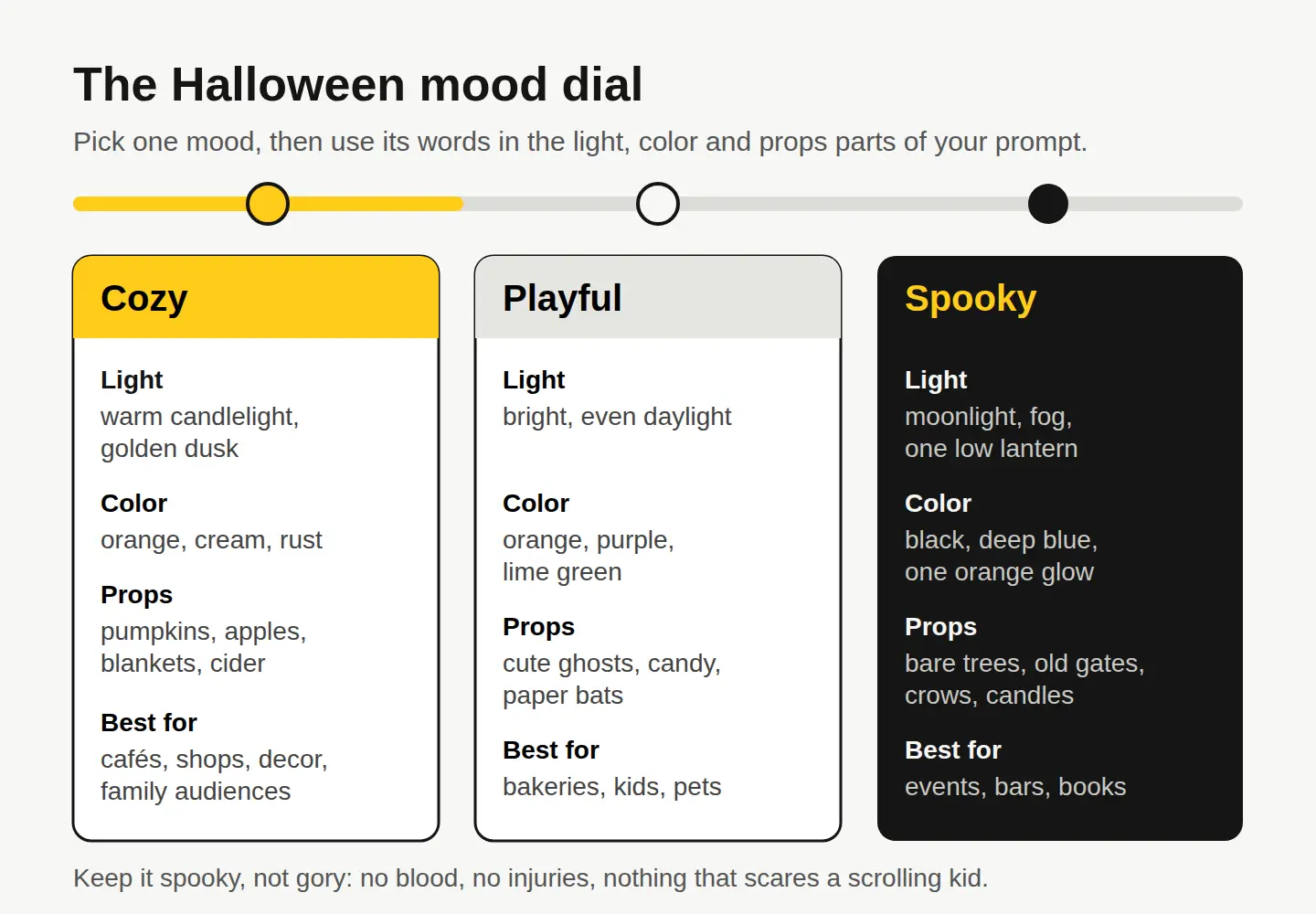
Cozy and playful work for almost any shop, café or service, because they look friendly in a feed full of ads. Spooky is great for events, haunted walks, bars and book launches, but keep it atmospheric. Fog, moonlight and one glowing lantern say “Halloween” without anything gory. If you plan to boost it, Meta’s ad standards on violent and graphic content don’t allow shocking, gruesome or sensational imagery in ads, so atmosphere is also the safe choice.
Two examples, with the exact prompts
Both images below were made with AI using Create, for 1 credit each. Neither is a photo of a real place or product.
A cozy cover image
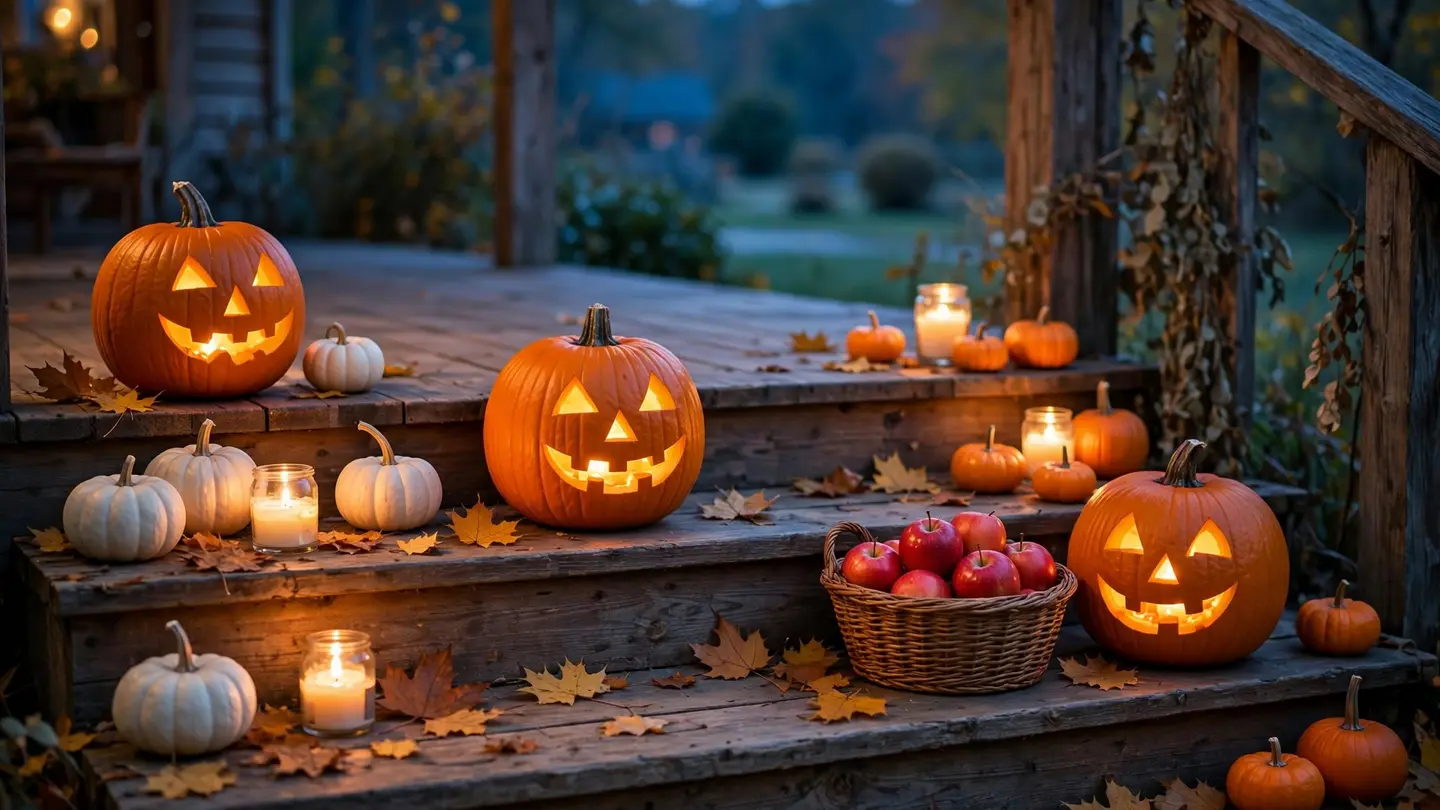
This one is the cover of this article. We wanted a warm, friendly scene that works as a Facebook cover, a website banner or the first frame of a story.
A photoreal wide view of wooden porch steps at dusk with three carved jack-o’-lanterns glowing warmly, small white and orange pumpkins, a woven basket of red apples, scattered autumn leaves and a few lit candles in glass jars, soft blue evening light in the background, cozy and friendly mood, no people
It came back with exactly what we asked for: three jack-o’-lanterns, the apples, the candles and that blue dusk behind. The props we named are the props we got, which is why it pays to name them.
A playful post with space for your offer
For a bakery or café post, we asked for a top-down shot in the 4:5 shape that fills a phone screen in the feed, and kept the top third empty for a headline.
A photoreal overhead view of a bakery tray of pumpkin-shaped sugar cookies with orange icing and ghost-shaped meringues with two small chocolate dots for eyes, on parchment paper on a dark slate counter, a few small decorative pumpkins and cinnamon sticks around the tray, soft window light from the left, playful and cozy mood, the top third of the frame plain dark slate with nothing on it
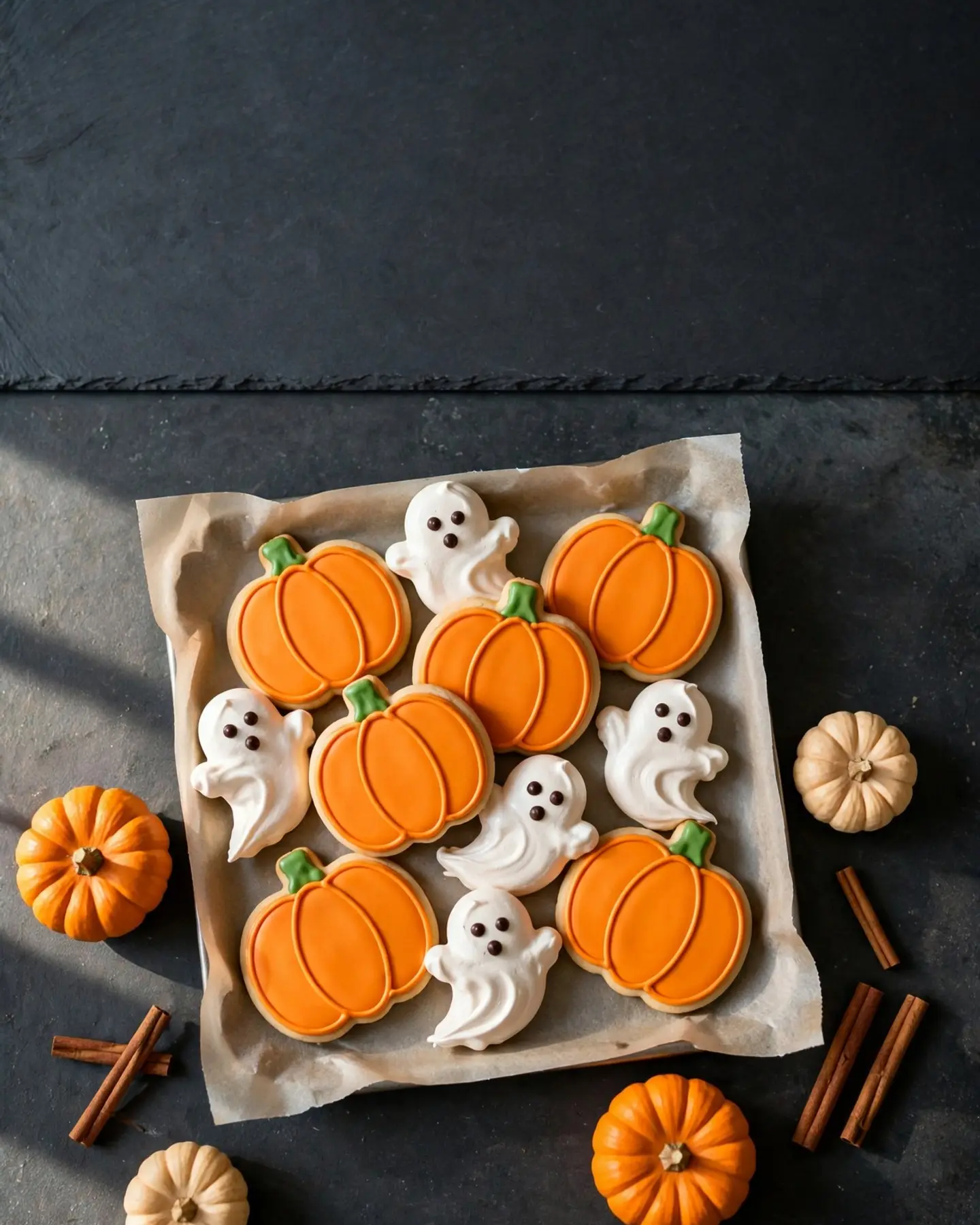
Two things to notice. The empty space worked: the top of the frame is plain slate, ready for “Ghost cookies are back” in the free editor’s Text or WordArt tool. And the AI added a third dot to each ghost, a little mouth we didn’t ask for. It’s cute, so we kept it, but it’s a reminder to look closely before you post.
One honest note: if you sell these cookies, an AI picture of cookies isn’t a picture of your cookies. Use it for mood and announcements, and use a real photo when the post says “this is what you’ll get.”
Can you add Halloween decorations to a photo you already have?
Yes. That’s often the best option for a real business, because the room, the cup and the croissant stay yours and only the decorations are new. In the free photo editor, Edit by prompt makes the change from one written instruction, for 1 credit an edit.
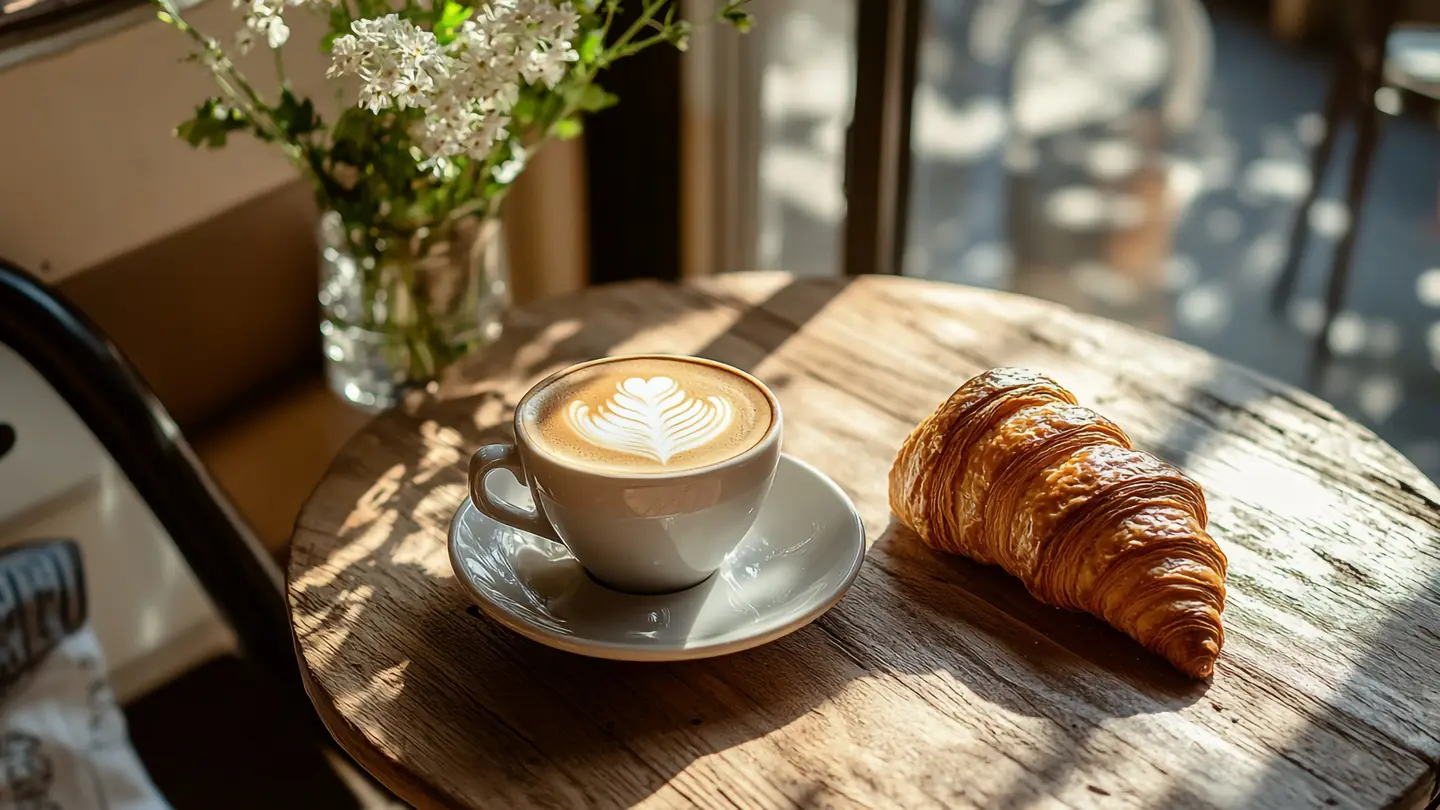
Here’s a licensed stock photo from our catalog, shown as it came, unedited:
We typed this into Edit by prompt:
Decorate the table for Halloween: put two small orange pumpkins and one small white pumpkin on the table behind the croissant, swap the white flowers in the vase for dried orange and burgundy autumn leaves, and add a few small paper bat cutouts on the window. Keep the coffee cup, the latte art, the saucer, the croissant, the wooden table and the sunlight exactly as they are.
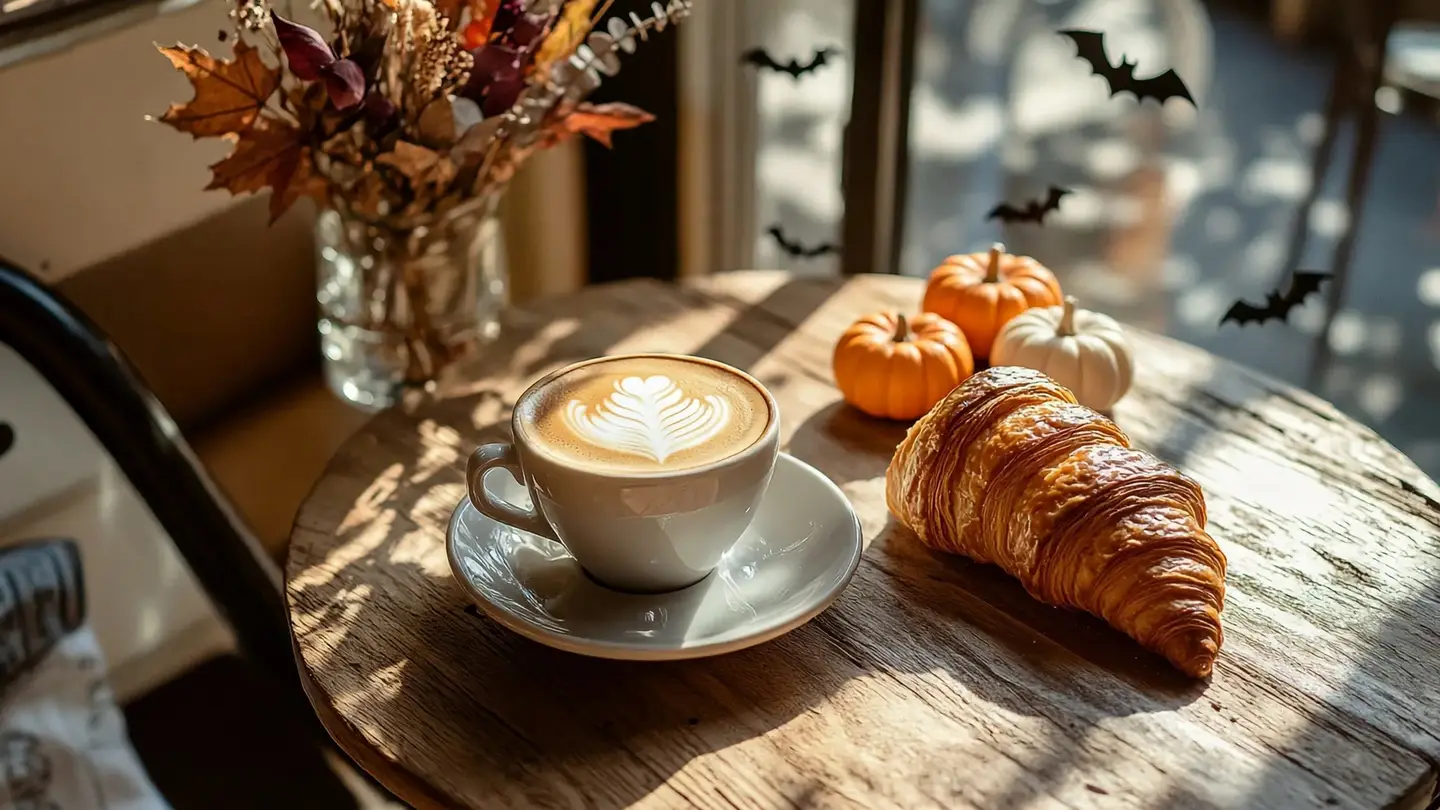
Everything we listed under “keep” stayed put: the latte art, the saucer, the croissant and the stripes of sunlight on the table. The three pumpkins, the dried leaves and the bats are the only new things. The “keep” list is what makes this work. Leave it out and the AI feels free to redraw the whole table.
The license detail matters here too: editing doesn’t change a stock photo’s license, but the legal protection covers the original photo only, not what the AI added. Our license page has the full terms.
What should you check before you post?
Run through this list at full size before anything goes out:
- Hands, faces and text. If the image has people in it, check fingers and eyes. AI images shouldn’t contain lettering; add your words in the editor instead.
- Candles and safety. No candles next to paper, curtains or costumes. Viewers notice.
- One mood. If a cute ghost slipped into a spooky scene, edit it out or start over.
- Room for the platform. Use the free social media resizer to export one design for Instagram, Facebook, X, Pinterest, TikTok and more in one zip.
- Say it’s AI where it matters. Don’t present an AI scene as a photo of your shop or product. Meta labels AI-generated images it can detect on Facebook, Instagram and Threads, and being upfront costs you nothing.
What does a Halloween image set cost?
Here’s what the examples in this article cost to make:
| What | Tool | Cost |
|---|---|---|
| Cozy cover image | Create | 1 credit |
| Cookie post with text space | Create | 1 credit |
| Licensed café photo | Stock photos | 10 credits ($0.10) |
| Halloween decorations added | Edit by prompt | 1 credit |
| Headline, resize, export | Free editor and resizer | Free |
That’s 13 credits, or 13 cents, for the whole set. New accounts get 30 free credits on sign-up with no card, then 3 free credits every day, so you can make all of it before you pay anything. If you need more, our pricing page lists the plans.
Your next step
Pick the one Halloween post you’ll need first, maybe the “we’re open late on the 31st” post or the seasonal menu. Choose its mood from the dial above, write the five-part prompt, and make three versions in Create. Keep the best, add your headline in the editor, and schedule it now, while you still have three weeks before Halloween.
Questions people ask
- Can I use AI Halloween images in paid ads?
- Yes. Images you make with Create can be used commercially, including ads. They come with no legal protection, though, and may not be copyrightable in many countries, so don't build a trademark or logo on one.
- Can I make a Halloween image of my own product with AI?
- Describing your product in a prompt gives you a lookalike, not your product. For your real item, use Product Studio, which turns one phone photo into 4 shots in a scene you pick, for 10 credits.
- How many Halloween images can I make for free?
- You get 30 free credits when you sign up, no card, then 3 free credits every day. At 1 credit an image, that's 30 tries on day one.
- Can I make a short Halloween video from one of these images?
- Yes. Bring a photo to life turns one image into a 6 or 10 second clip, from 100 credits for the shortest one.
Keep reading
 AI image generationWhich AI image style fits your brand? One prompt, 4 stylesKeep the scene, swap only the style words. We made one café scene in 4 AI styles for 4 credits: the exact prompts, what each suits, and how to stay consistent.
 AI image generationHow to write AI image prompts that get what you wantDescribe a photo, not a topic: style, subject, setting, light, color and camera. See one idea prompted two ways, with the real results and exact prompts.
 DesignHow to make text readable on a photo: 4 fixes comparedGive the words a calm, high-contrast spot: a dark gradient, a color box, or a cleared area. We tested all four on one busy photo, with contrast numbers.