Best AI image generator: how to pick one with 4 real tests
The best AI image generator follows your prompt, leaves room for text and has a license you can use. Four quick tests, with real results and prompts.
The best AI image generator is the one that follows your prompt closely, leaves room for your layout, can fix a near miss, and comes with a license you can actually use, at a price per usable image you can live with. Rankings change every few months, so instead of another top-10 list, here are four tests you can run on any generator in about ten minutes.
We ran the first two tests on Create, our own AI image generator, and you’ll see the exact prompts and the unretouched results below, including what didn’t go to plan. Then we cover the checks that matter after image quality: license, privacy and cost.
What makes an AI image generator the best one for you?
Most “best of” lists agree on one thing: there’s no single winner. Some tools are praised for artistic looks, others for lettering, others for following a prompt word for word. What matters is which strengths match the job in front of you.
For business images (social posts, product pages, ads, blog covers), these are the questions that decide it:
| What to judge | Why it matters | How to check it |
|---|---|---|
| Prompt adherence | You need your picture, not an average one | Ask for counts and positions (Test 1) |
| Layout control | Most images get a headline or a button on top | Ask for empty space (Test 2) |
| Editing | Starting over wastes time and credits | Ask for one small change (Test 3) |
| Style consistency | A feed or a shop should look like one brand | Use a reference image (Test 4) |
| License | Some uses need permission in writing | Read the terms, not the homepage |
| Privacy | Product launches and client work can be confidential | Look for a private mode |
| Cost per usable image | Cheap tries add up if most miss | Count tries per keeper |
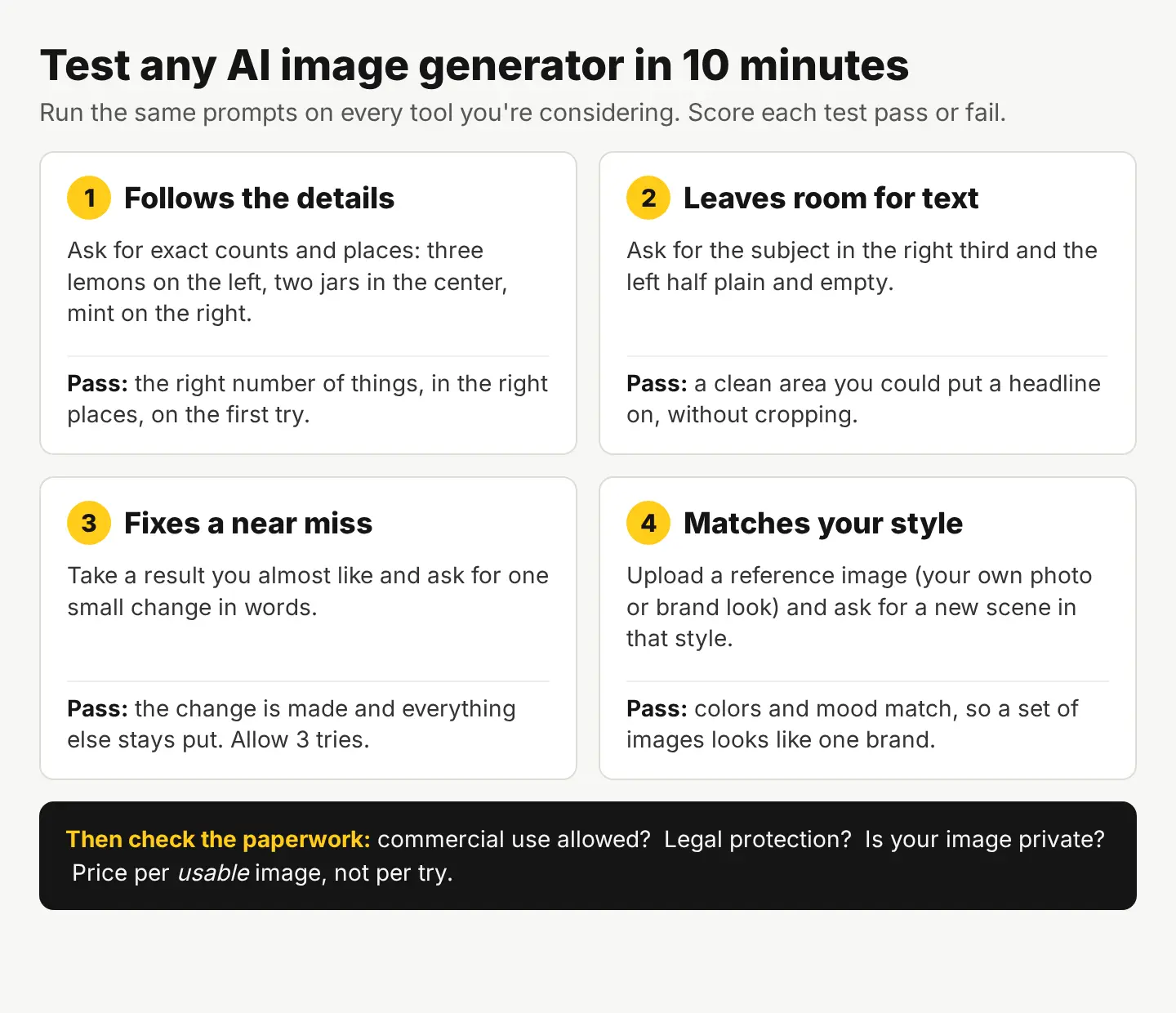
Here’s the whole method on one page. Run the same prompts on every tool you’re considering and score each test pass or fail.
Test 1: Does it follow a detailed prompt?
A generator that ignores half your words will cost you more in retries than it saves. The quickest way to find out is a prompt with exact counts and positions, because those are where models slip most.
Here’s the prompt we used, word for word:
A photoreal top-down photo of a pale blue kitchen table with exactly three yellow lemons on the left, one of them cut in half, two small glass jars of honey in the center, and a sprig of fresh mint on the right, soft morning light, clean minimal styling
And here’s the first result, with no retries and no picking the best of several:
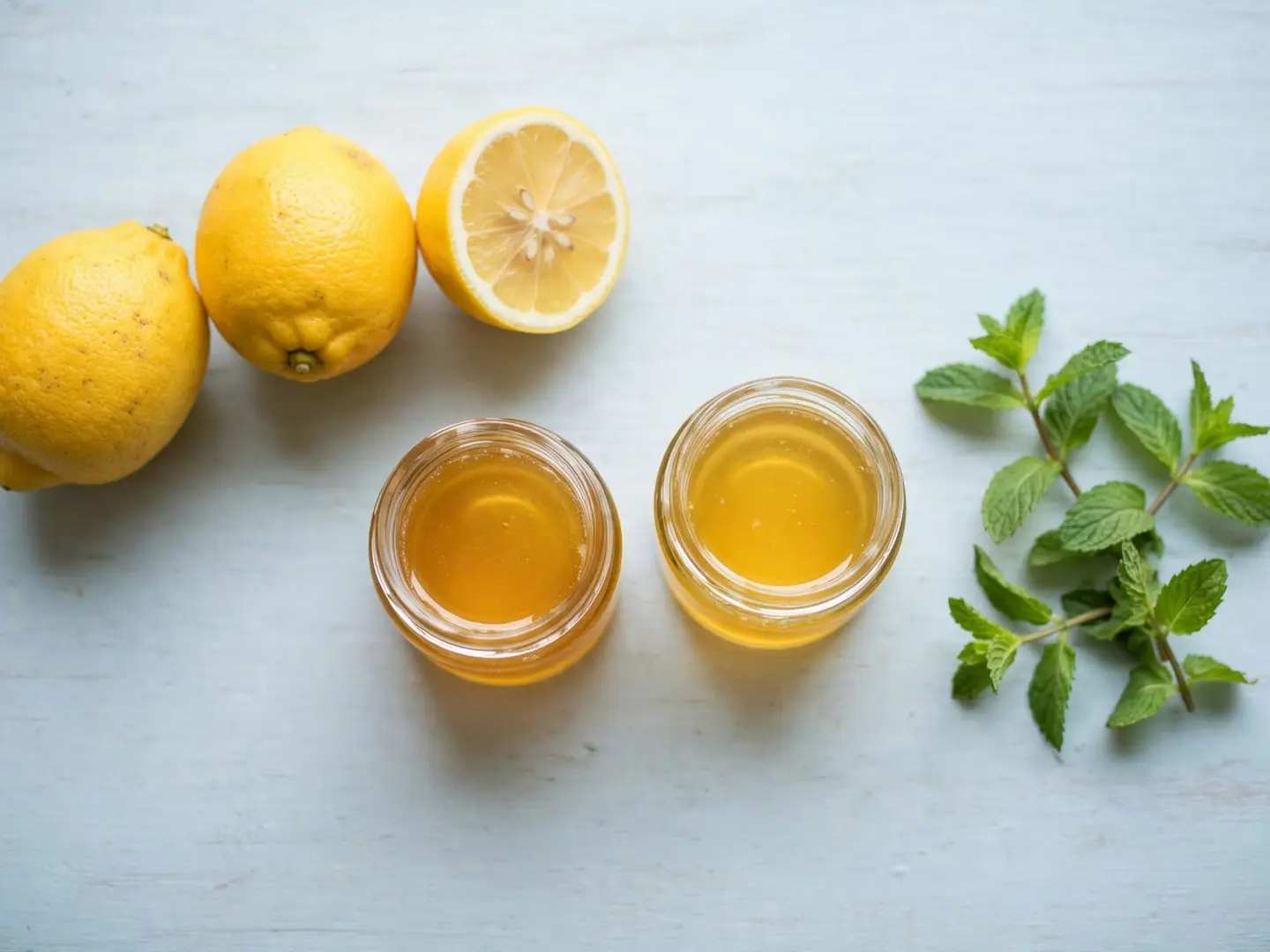
Score: pass. Three lemons on the left, one of them cut (we see its half), two honey jars in the center, mint on the right, a pale blue table, soft light. Every part of the prompt is there.
Run the same prompt on each tool you’re comparing. If one gives you five lemons or puts the mint in the middle, you’ve learned more than any ranking can tell you.
Test 2: Can it leave room for your text?
Most business images end up with words on them: a headline, a price, a “Shop now” button. A generator that fills every corner forces you to crop, which often cuts your subject. So ask for empty space on purpose.
A photoreal product photo of a single amber glass candle jar on a light oak shelf against a warm beige wall, the candle placed in the right third of the frame, the left half of the frame plain and empty, soft evening light, shallow depth of field
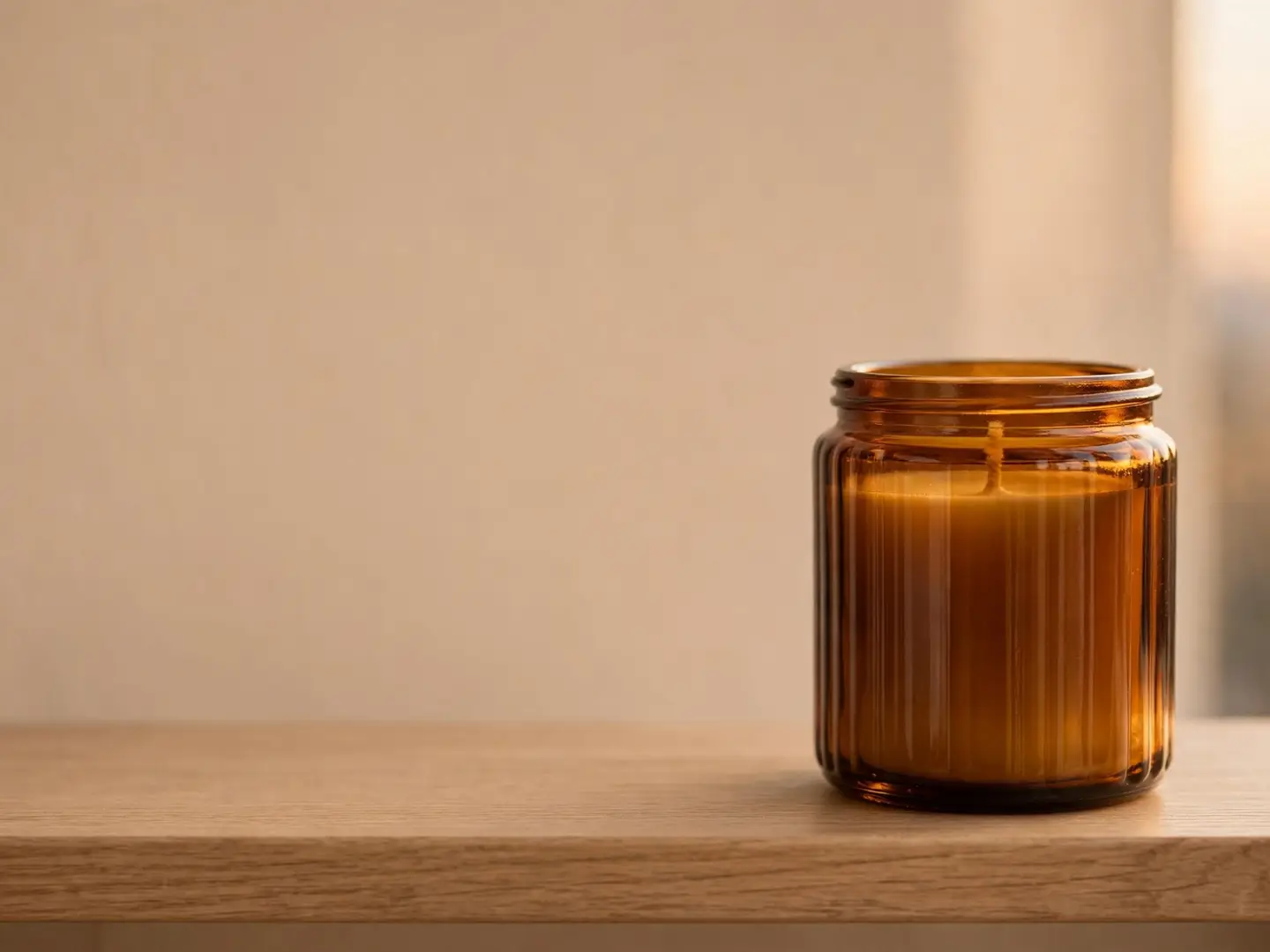
Score: pass. The candle sits in the right third and the left half is a clean wall, ready for a headline in the free photo editor with Text or WordArt. That’s also our answer to lettering: generate the picture clean, then add the words yourself, so the spelling and the font are exactly yours. (We cover why that works in how to make text readable on a photo.)
Test 3: Can it fix a near miss without starting over?
Even good prompts often land almost right. The tool you want lets you describe the missing detail in words and keeps everything else. Ours is Edit by prompt in the editor, at 1 credit an edit.
We tried it on the candle photo, asking for a sprig of dried eucalyptus on the shelf, and the first attempt came back as a different scene entirely. AI edits don’t always land, and that’s exactly why this test exists. Judge a tool on three tries, not one, and check two things each time:
- Was the change made? The eucalyptus is there, in a sensible place.
- Did everything else stay put? Same candle, same shelf, same light, same empty space.
- Can you go back? Keep the original until you’re happy with an edit.
If a tool fails all three tries on a simple change, expect to spend your time regenerating instead of editing.
Test 4: Will it match your brand’s style?
One great image is easy. Twenty images that look like they belong to the same shop is the real test. Look for reference images: you upload a photo (your own product shot, a past post you like) and the generator uses it to steer colors, light and mood.
In Create, you add a reference image next to the prompt. Try it with one of your own photos and a prompt for a new scene, then put the result next to your existing feed. If it looks like it came from someone else’s brand, that tool will create work, not save it. For a full walk-through, see image to image AI, with a real example.
What should you check besides image quality?
Image quality gets you a shortlist. The paperwork decides whether you can actually use the pictures. Here’s what to look for, with our own answers so you can compare like for like:
| Check | What to ask | Create on StockUnlimited |
|---|---|---|
| Commercial use | Can I use it in ads, on products, for clients? | Yes, commercial use allowed |
| Legal protection | Who covers me if there’s a claim? | None for AI images (licensed stock photos come with up to $5,000) |
| Copyright | Do I own it? | AI images may not be copyrightable in many countries |
| Privacy | Is my image saved or shared? | Private mode keeps the image in your browser only |
| Price | What does one image cost? | 1 credit (1 cent) an image |
| Free tier | Can I test it without paying? | 20 credits on sign-up, no card, then 3 free a day |
The copyright row surprises people. The U.S. Copyright Office has said that images produced from a prompt alone lack human authorship and aren’t protected, though your own edits and arrangement can be (its AI reports are here). In practice: use AI images freely, but don’t build a logo or a trademark on one. Our license page has the full terms for both stock and AI images.
If an image has to be a real place, a real product or real people, a licensed stock photo is usually the safer pick. We compare the two in stock photo or AI image?
How much does a usable AI image cost?
Price per image only tells half the story. What you pay for is a keeper: the image you actually post. Work it out like this:
- Price per try × tries per keeper = cost per usable image.
- In our two tests above, both prompts gave a keeper on the first try, so each image cost 1 credit, or 1 cent.
- If a harder idea takes five tries, it costs 5 cents. Writing a clearer prompt is the cheapest fix; our guide to AI image prompts that work shows how.
At 1 credit an image, the 20 free credits you get on sign-up cover 20 tries, and the 3 free credits a day add up to about 90 a month. If you need more, the Monthly plan is $4.99 for 500 credits (see pricing).
Your next step
Copy the two prompts above, run them on every generator you’re considering, and score them with the four tests. It takes about ten minutes and a handful of credits, and you’ll know which tool fits your work better than any list can tell you. To start with ours, open Create: your 20 free credits are enough to run every test twice.
Questions people ask
- Is there a free AI image generator?
- Many tools have a free tier. On StockUnlimited you get 20 free credits when you sign up, no card needed, then 3 free credits every day, and one AI image costs 1 credit.
- Can I sell products with AI-generated images on them?
- With Create, yes: commercial use is allowed. AI images come with no legal protection, though, and may not be copyrightable, so avoid using one as a logo or trademark.
- Are my prompts and images private?
- Turn on Private mode in Create and the image stays in your browser: nothing is saved to your account or our servers.
- Should I use an AI image or a stock photo?
- Use a licensed stock photo when the image must show a real place, product or person, or when you want legal protection. Use AI for scenes stock doesn't have.
Keep reading
 AI image generationAI product photography: turn one phone photo into a full setKeep your real product, let AI change the scene. The workflow, a real candle photo placed in two scenes with the exact prompts, and marketplace rules.
 AI image generationImage to image AI generator: how it works, with a real exampleAn image to image AI generator turns a photo you have into a new version. See one room edited twice, the exact prompts, and when to use each method.
 AI image generationHow to make Halloween images with AI for your businessPick a mood, describe the scene and props, and leave room for your text. Two real examples with exact prompts, plus a stock photo decorated for Halloween with AI.