How to plan a Q4 social media content calendar
Mark the fixed dates, split 13 weeks into three phases, and budget every image up front. A 39-post plan whose images cost 108 credits in total.

To plan a Q4 social media content calendar, mark the fixed dates first (Halloween, Black Friday weekend, the holidays), split the 13 weeks into three phases, pick a posting rhythm you can keep, and decide where every image will come from before October starts. The last step is the one most plans skip, and it’s the reason calendars fall apart in late November.
This article walks through the dates that matter, a three-phase plan for 39 posts, a simple weekly template, and a real image budget for the whole quarter using our prices: 108 credits, where 1 credit is 1 cent.
Which dates should a Q4 content calendar include?
Start with the dates you can’t move. In the US, Thanksgiving is the fourth Thursday of November, and the big shopping days hang off it. In 2026 that puts them close together:
| Date | Occasion | What to post |
|---|---|---|
| Oct 10 | World Mental Health Day | A calm, helpful post if it fits your brand; skip it if it doesn’t |
| Oct 31 | Halloween | Seasonal visuals, a small offer, behind-the-scenes |
| Nov 26 | Thanksgiving | A thank-you post to customers |
| Nov 27 | Black Friday | Your main offer, with the dates and terms clear |
| Nov 28 | Small Business Saturday | Why buying from you matters; the people behind the shop |
| Nov 30 | Cyber Monday | Online-only offers or a last-call reminder |
| Dec 1 | GivingTuesday | A cause you support, if you genuinely do |
| Mid-December | Last order dates for delivery | A clear “order by” reminder, a few days before your carrier’s cutoff |
| Dec 31 | New Year’s Eve | Your year in review, and what’s coming next |
The US Small Business Administration explains how Small Business Saturday works if you want to lean into it as a local shop. Outside the US, swap in your own dates: the structure below still works.
You don’t need a post for every occasion. Pick the three or four that make sense for your customers, and let the rest go. A bakery can skip Cyber Monday; an online print shop probably shouldn’t.
How do you split Q4 into phases?
Thirteen weeks is too long to plan post by post in one sitting, and too short to leave to chance. Three phases of roughly a month each give every stretch one job:
- Autumn (Oct 1 to Nov 1). Build attention before anyone is shopping. Seasonal posts, how things are made, useful tips, and one Halloween moment.
- The big weekend (Nov 2 to Dec 1). Tease your offer early in November, then run it from Black Friday through Cyber Monday. This is where your product photos need to look their best.
- Holidays (Dec 2 to Dec 31). Gift ideas, “order by” reminders, a thank-you, and a year in review.
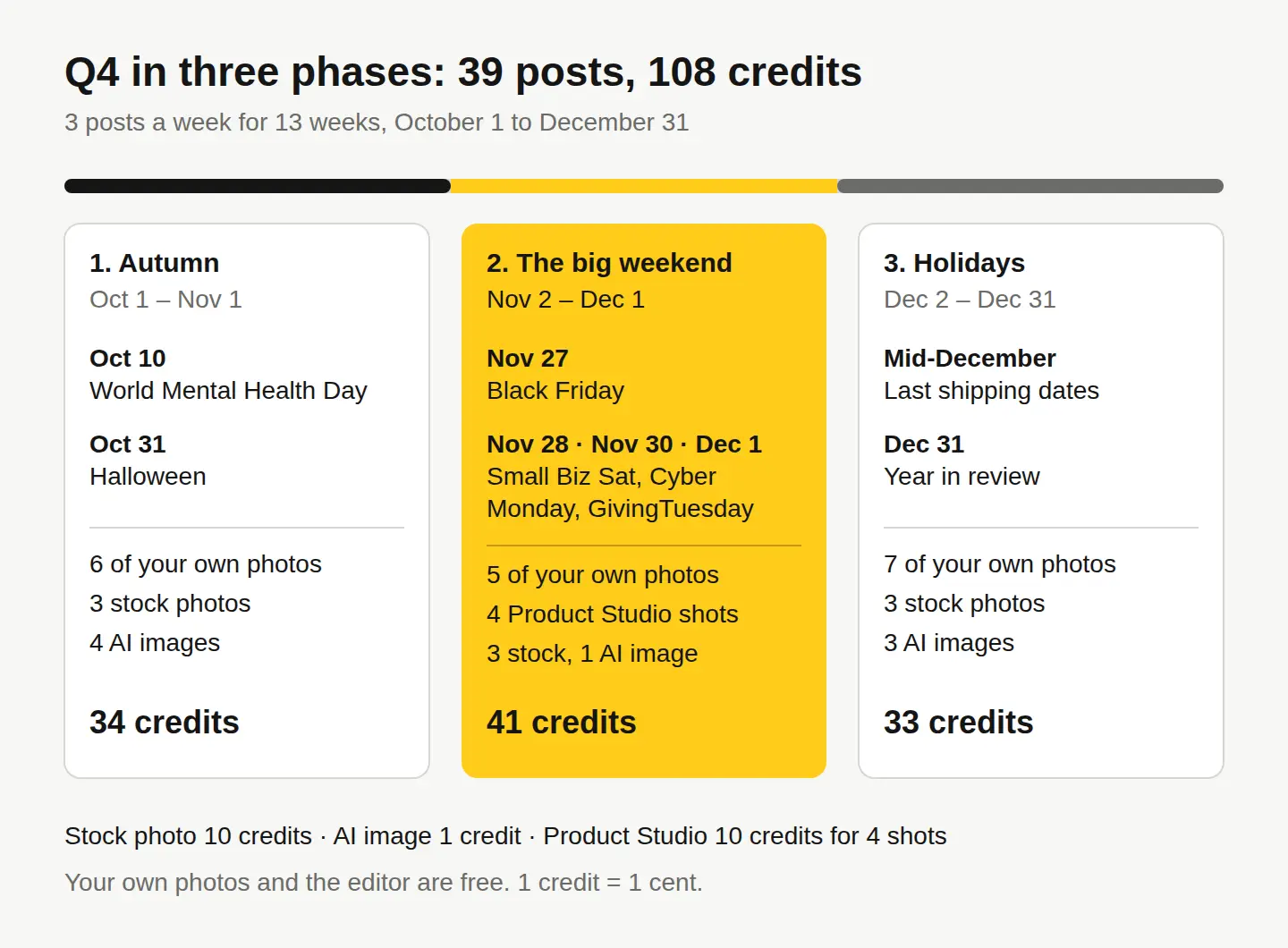
At three posts a week, that’s 13 posts per phase and 39 for the quarter. If three a week is more than you can keep up, plan two. A smaller plan you actually post beats a big one you abandon in week five.
What does a week of posts look like?
A fixed weekly template means you only decide the what, never the when. Here’s one that fits most small businesses:
| Day | Post type | Where the image comes from |
|---|---|---|
| Monday | Useful: a tip, a how-to, an answer to a question customers ask | A stock photo or an AI image |
| Wednesday | Real: your product, your workspace, your people | Your own photo, cleaned up in the free editor |
| Friday | Selling: an offer, a new product, a reminder | Your product photo, or a Product Studio scene |
Once the template is set, fill the calendar in a spreadsheet or in your scheduling tool. Meta’s own guide to the Business Suite calendar shows how to plan and schedule Facebook and Instagram posts ahead of time, so a batch you write on a Sunday goes out on its own.
Where do the images for 39 posts come from?
This is where most calendars stall: the captions are easy, but finding 39 images that look like they belong together isn’t. Decide the source for each slot up front, using the cheapest option that does the job:
- Your own photos (free). Anything showing your real product, place or team should be a real photo. Open it in our free photo editor to crop, fix the light with Adjust & Finetune, and add a headline with Text or WordArt. No watermark, no cost.
- Stock photos (10 credits, $0.10 each). For moods and scenes you can’t shoot yourself: autumn streets, cozy kitchens, winter light. They’re real photos by real photographers, licensed for commercial use, including ads.
- AI images (1 credit each). For the specific scene stock doesn’t have, in your colors, with space for text exactly where you want it. Create makes them from a description.
- Product Studio (10 credits for 4 shots). One phone photo of your product becomes 4 studio-quality shots in any of 33 scenes, including occasions. Useful for giving Black Friday posts a festive setting without a photo shoot.
Here’s how that adds up for the plan above:
| Source | Posts | Cost |
|---|---|---|
| Your own photos, edited free | 18 | Free |
| Stock photos | 9 | 90 credits |
| AI images | 8 | 8 credits |
| Product Studio (one set of 4 shots) | 4 | 10 credits |
| Total | 39 | 108 credits |
New accounts get 30 free credits on sign-up, with no card, then 3 free credits every day. If you’d rather make everything in one sitting, the Monthly plan is $4.99 for 500 credits, which covers this quarter with plenty left over. All plans are on our pricing page.
How do you keep the posts looking consistent?
Consistency is what makes a feed look planned instead of improvised. Three habits do most of the work:
- Keep one set of colors and one font for every headline you add in the editor. Pick them in October and don’t change them until January.
- Leave the same space for text in every image you make or pick: the left half, the bottom third, whatever suits you.
- Reuse one scene across phases instead of starting from scratch each month.
That last one is the cheapest trick in the plan. We made the autumn post below with Create for 1 credit, with empty space on the left for a headline. The exact prompt we used:
A photoreal top-down flat lay on a dark slate surface: three small orange pumpkins with no faces carved, a few dried red and yellow maple leaves and a lit candle in a small glass jar, grouped in the right half of the frame, the left half plain empty dark slate, warm moody evening light, autumn mood, no people

For December, we ran that same image through Edit by prompt, also 1 credit, with this instruction: “replace the pumpkins and maple leaves with small pine branches, pine cones and two small gifts wrapped in plain brown paper with twine, keep the slate surface, the candle, the empty left half and the warm light exactly the same.”

Same surface, same light, same empty space for text: two phases of your calendar now look like one brand. For more on this technique, see how to change the season in a photo with AI.
Once a post is designed, run it through the social media resizer to get the Instagram, Facebook, Pinterest and other sizes in one zip, free.
Your next step
Open a spreadsheet today and make 13 rows, one per week from October 1. Mark the fixed dates from the table above, write the three phase names, and fill in just one column: where each week’s images will come from. Then make the first two weeks of images in one sitting, and schedule them. The rest of the quarter gets much easier once October is already done.
Questions people ask
- How far ahead should I plan my Q4 posts?
- Plan the whole quarter's outline in early October, then write and schedule posts two to four weeks at a time. That leaves room to react to news without losing the big dates.
- Can I use stock photos in Black Friday ads?
- Yes. Our stock license covers commercial use, including ads and social posts. Recognizable people need a model release, and our search shows which photos have one.
- Should I tell followers an image was made with AI?
- It's a good habit, and some platforms ask for it. Never present an AI image as a real photo of your product, shop or customers.
- What if I fall behind on the calendar?
- Drop to two posts a week rather than skipping weeks, and protect the posts tied to fixed dates. A missed tip post matters much less than a missed Black Friday reminder.
Keep reading
 Photo editingHow to change the season in a photo with AIName the season, say what changes and what stays, and one AI edit turns summer into fall. A real before and after, the exact prompts and a season cheat sheet.
 By industryWhat photos does an Etsy listing need? A shot-by-shot planThe real item first, then details, scale, options and packaging, at 2000 px or more. The full shot list, Etsy's crop trap, and free tools to make each photo.
 Photo editingHow to remove unwanted objects from a photo, freeBrush over it with the free Magic eraser, or describe the change with Edit by prompt for 1 credit. Which tool fits which job, step by step, with a real example.